

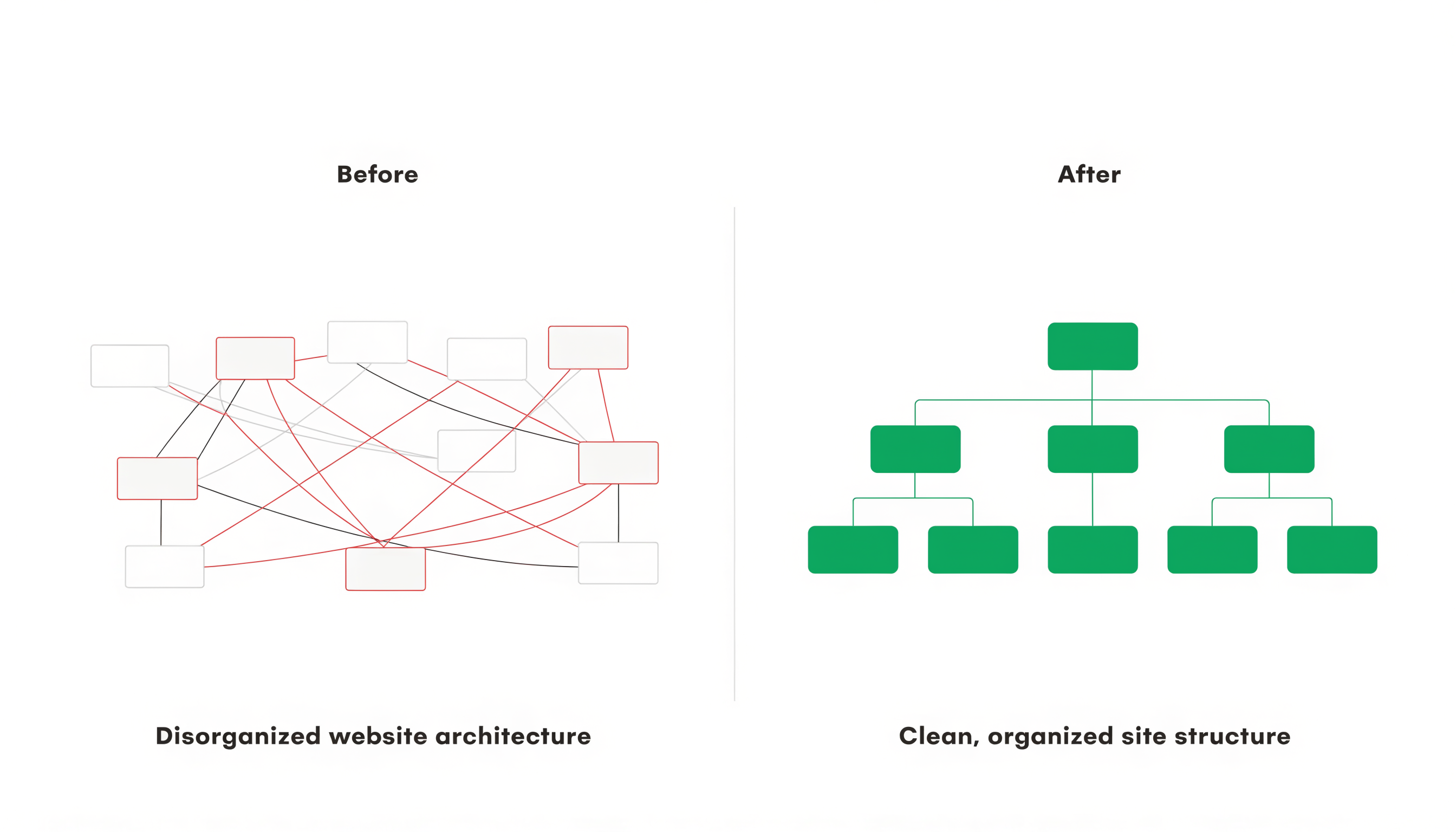
We took on a client last year whose website had 868 pages. They had 42 service pages, 22 industry pages, 470 location pages, 235 resource pages, 37 integration pages, and a handful of other sections. Sounds like a big site with a lot of content. Should rank well, right?
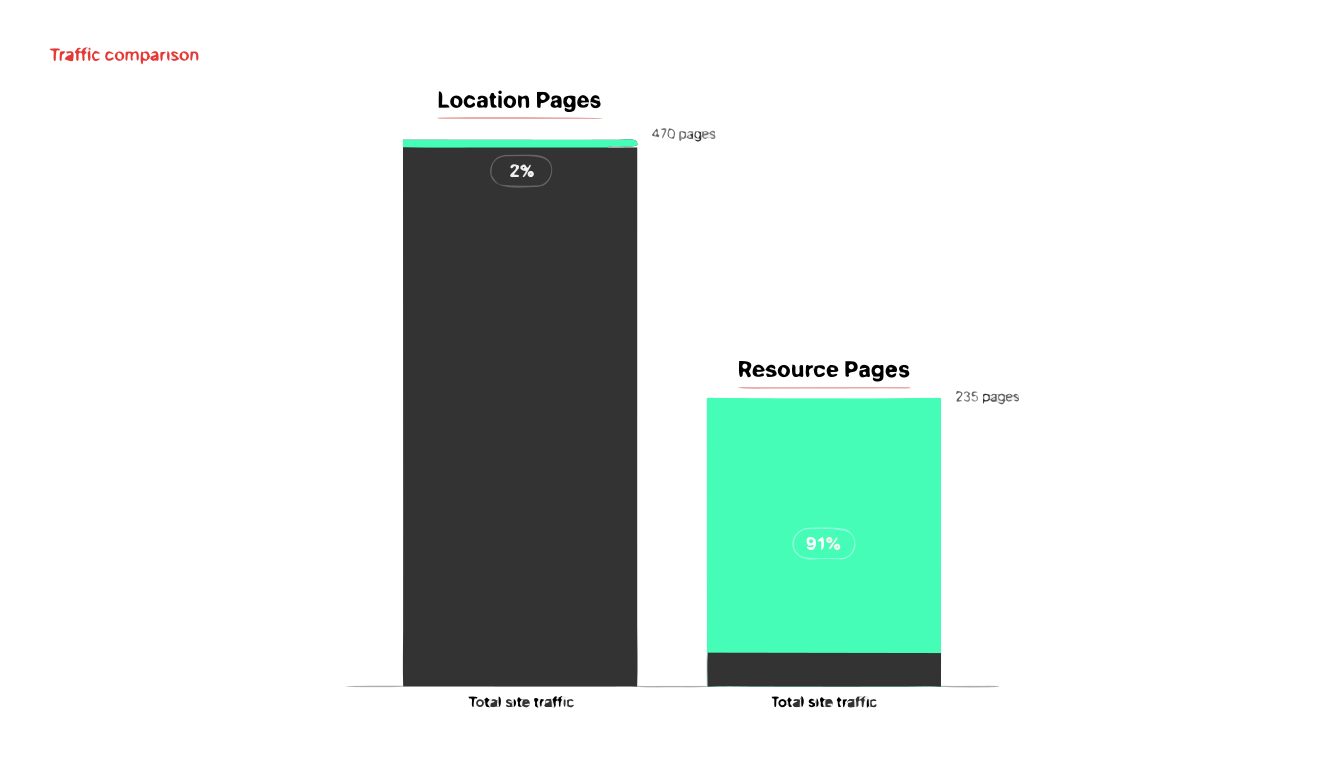
Not really. Of those 868 pages, only 221 were getting any organic traffic at all. The location pages, which made up more than half the site, were driving 2% of total traffic. The resource section, just 235 pages, was driving 91%. The site had nearly 4,000 URLs that Google had found but chose not to index.
The content wasn't terrible. Some of it was quite good. The problem was that the site's structure made it nearly impossible for Google to figure out what mattered. Pages that should have been grouped together lived in different sections. URL patterns were inconsistent. Topics that spanned multiple sections of the site had no clear hierarchy connecting them. The site had grown organically over years, and nobody had ever stepped back to look at the whole picture.
This is more common than you'd think. Most websites don't have a content problem. They have an architecture problem.
What information architecture means for SEO
Information architecture is how your pages are organized, connected, and presented to both users and search engines. It includes your URL structure, your navigation, your internal linking patterns, and the logical grouping of your content into sections and categories.
For SEO, architecture determines three things that directly affect your rankings.
How Google discovers and crawls your pages. Google follows links. If a page is buried four clicks deep with no internal links pointing to it, Google finds it slowly or not at all. If your sitemap includes 700 URLs but your navigation only exposes 50, Google gets mixed signals about what you consider important.
How Google assigns topical relevance. Pages grouped together in a logical URL hierarchy signal that they're related. /services/engineering-staffing/controls-engineer/ tells Google that the controls engineer page is a child of engineering staffing, which is a child of services. That contextual hierarchy helps Google understand what each page is about beyond just the words on it.
How link equity flows through your site. When an external site links to one of your pages, some of that authority passes through your internal links to connected pages. If your internal linking is scattered and disorganized, that equity dissipates. If it flows through a clean hierarchy, it concentrates on the pages you want to rank.
Bad architecture undermines all three. You can write the best content in your industry, but if it's trapped in a structural mess, it won't perform to its potential.
The symptoms of bad architecture
Most businesses don't realize their architecture is the bottleneck because the symptoms look like other problems.
Pages that should rank well don't. You have a comprehensive, well-written service page, but it sits on page 3 of Google. You assume the content needs work or the competition is too strong. In reality, the page might be orphaned (few internal links pointing to it) or nested under a confusing URL path that weakens its topical signal.
Multiple pages compete for the same keywords. This is keyword cannibalization, and bad architecture is often the root cause. When your site has a service page about SEO, a blog post about SEO, and a case study about SEO, all in different sections with no clear hierarchy, Google has to guess which one to rank. It usually guesses wrong.
New content doesn't move the needle. You publish blog posts consistently but organic traffic stays flat. The posts aren't connected to your service pages or to each other. They exist in a vacuum, so they don't accumulate authority over time. Each new post is starting from zero instead of building on what already exists.
Your crawl budget gets wasted. For larger sites, Google allocates a limited crawl budget. If your site has hundreds of low-value pages (thin location pages, tag archives, pagination URLs) mixed in with your important content, Google spends its crawl budget on pages that don't matter and may not get to the ones that do.
Users can't find what they're looking for. If your navigation is confusing, users bounce. High bounce rates and low engagement signal to Google that your pages aren't satisfying search intent, which pushes you down in rankings.
How to audit your site's architecture
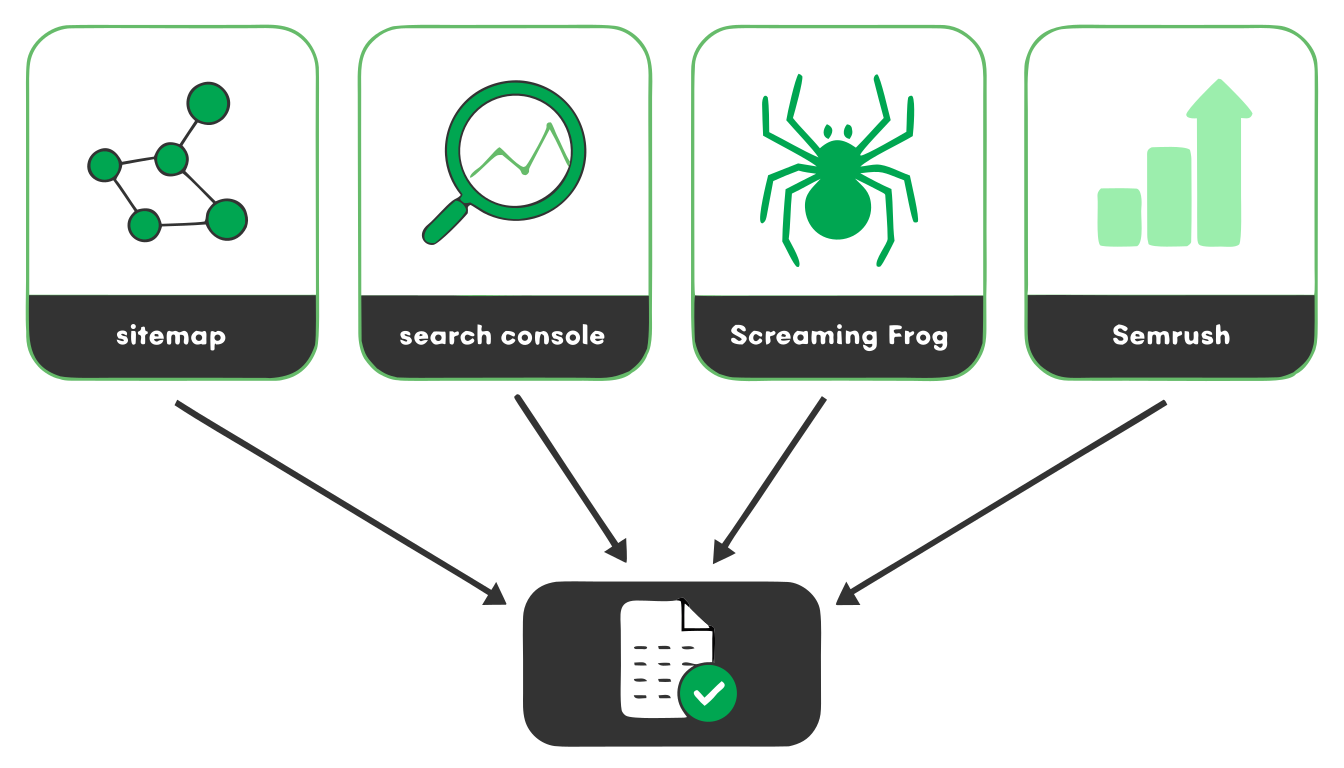
You can't fix what you can't see. Before making any changes, you need a complete inventory of what's on your site and how it's organized. This requires cross-referencing multiple data sources, because no single tool gives you the full picture.
Source 1: Your sitemap
Your XML sitemap tells Google which pages you consider canonical and worth indexing. Pull it up and look at the total count. Then compare it to reality. How many of those URLs actually exist and load properly? Are there important pages missing from the sitemap? Are there old pages in the sitemap that should have been removed years ago?
On the client site I mentioned earlier, the sitemap included 713 URLs. The full inventory turned up 868 pages. That's 155 pages that existed on the site but weren't in the sitemap. Some were legacy pages that had been replaced. Some were accidentally excluded. Either way, Google was getting an incomplete picture of the site from the sitemap alone.
Source 2: Google Search Console
Search Console shows you what Google actually knows about your site. The Index Coverage report tells you how many pages Google has discovered, how many it indexed, and how many it chose not to index (and why). The Performance report shows you which pages are actually earning impressions and clicks.
Export the Performance data and look at which pages drive traffic. Sort by impressions and clicks. You'll probably find that a small percentage of your pages generate most of your organic visibility. That's normal. What matters is whether those high-performing pages are the ones you'd expect. If your best content is buried while thin pages are getting impressions, your architecture is sending the wrong signals.
Source 3: A crawl tool (Screaming Frog)
Screaming Frog crawls your site the way Google does, following links page by page. It reveals the structure that exists in practice, not just in theory.
Run a full crawl and look at crawl depth, which is how many clicks it takes to reach each page from your homepage. Pages at depth 1-3 are easily discoverable. Pages at depth 5+ are effectively hidden. If important service pages require 5 clicks to reach, they need to be elevated in your navigation or linked from higher-level pages.
Also check for orphan pages (pages with no internal links pointing to them), broken internal links, and redirect chains. These are all architectural problems that erode your SEO performance.
Source 4: Semrush or Ahrefs
Your rank tracking tool shows which pages are earning keyword rankings and traffic. Export this data and cross-reference it with your sitemap and crawl data. You're looking for mismatches.
Pages with rankings but low traffic might have thin content or poor click-through rates. Pages with traffic but no rankings in your tracking might be ranking for keywords you didn't expect (which could indicate either an opportunity or a cannibalization problem). Pages with neither rankings nor traffic are candidates for consolidation or removal.
Putting the picture together
Once you have data from all four sources, compile it into a single spreadsheet. Each row is a URL. Columns for: page title, URL, section/hub it belongs to, in sitemap (yes/no), indexed in Google (yes/no), monthly traffic, keyword count, crawl depth, and internal links count.
Sort this spreadsheet by section. Look at each section of your site and ask:
How many pages does this section have, and what percentage of your total traffic does it drive? If a section has 470 pages and drives 2% of traffic, that's a structural problem worth investigating. If another section has 235 pages and drives 91% of traffic, that's where your architecture is working and you should understand why.
Are the pages in each section actually related to each other? Or did they end up in the same section by accident, because someone had to put them somewhere?
Do the URL patterns within each section follow a consistent logic? Or is it a mix of /service-name/, /services/service-name/, /our-services/service-name/, and /blog/service-name-guide/?
The most common architectural problems
Location pages that outgrew their usefulness
This is the big one. At some point, an agency or a plugin generated dozens (or hundreds) of location pages. "Service in Detroit." "Service in Ferndale." "Service in Royal Oak." Same content, different city names. They were supposed to capture local search traffic.
The problem is that Google stopped treating these as distinct, valuable pages years ago. Now they're thin content that dilutes your site's authority. They take up crawl budget. They compete with your main service pages. And most of them generate zero traffic. On the site we audited, 470 location pages produced 577 monthly visits. That's about 1.2 visits per page per month. The 42 service pages produced 406 visits with less than a tenth the page count.
The fix is usually consolidation. Redirect the thin location pages to your main service page (or to a single, well-structured local SEO landing page that covers your full service area). This concentrates your ranking signals instead of scattering them.
Flat URL structures with no hierarchy
Some sites put everything at the root level. Every page is domain.com/page-name/ regardless of what section it belongs to. Service pages, blog posts, team bios, case studies, all at the same URL depth with no parent-child relationships.
This tells Google nothing about how your content is organized. It's the digital equivalent of throwing every document in your office into one filing cabinet drawer. You can still find things if you know what you're looking for, but there's no structure to help you discover related content or understand the relationships between pages.
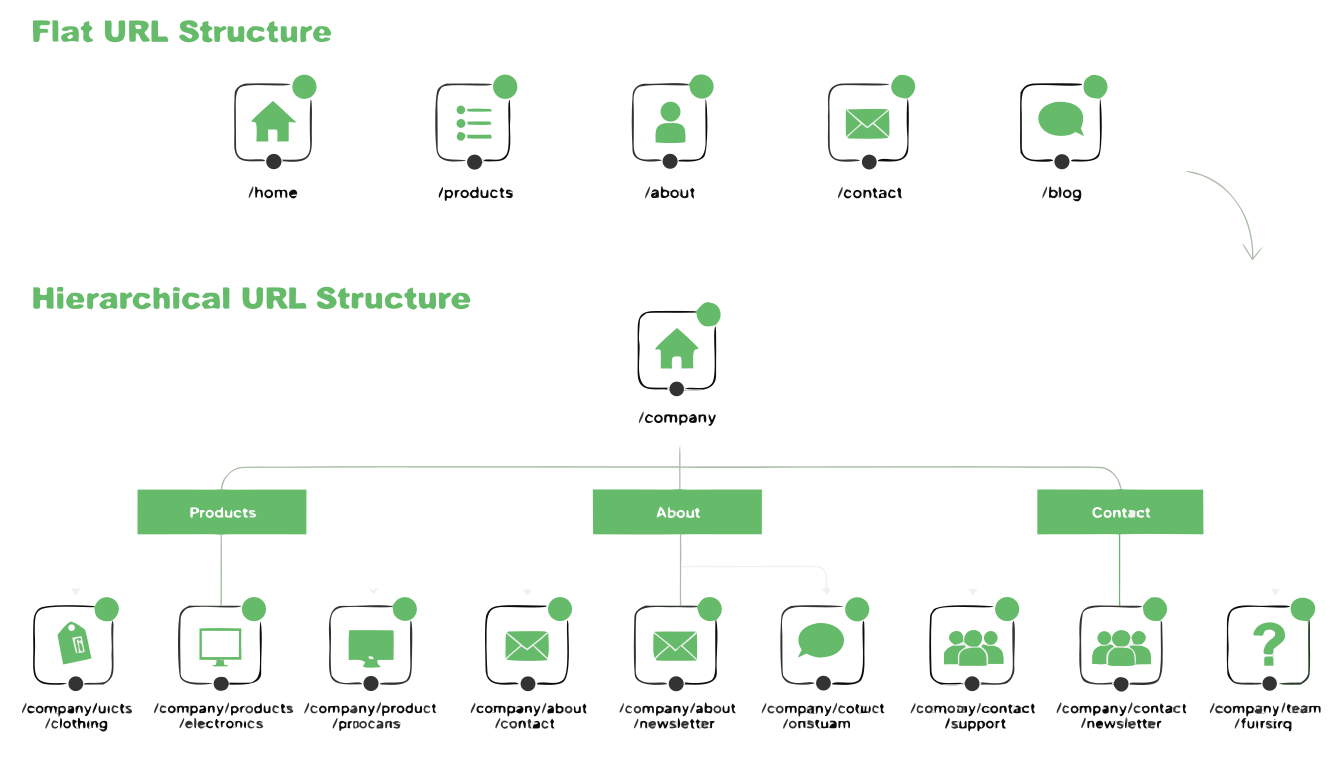
The fix is to create a logical URL hierarchy that mirrors your content hierarchy. Services nest under /services/. Blog posts nest under /blog/. Industry pages nest under /industries/. If you have hub-and-spoke content clusters (and you should), the spokes nest under their pillar.
Content that spans sections without a clear home
A common problem for businesses that serve multiple industries with multiple services. You have a page about "HVAC answering services" that could live under Services (because it's a service) or Industries (because HVAC is an industry). So it ends up in one section, with no structural connection to the other.
The result is that your site's topical clusters don't align with your architectural sections. A topic like "medical answering services" might have pages scattered across Services, Industries, Integrations, and Resources with no hub page connecting them. Google can't see the cluster because the architecture fragments it.
The fix involves choosing a primary home for each page based on its primary intent, then using internal linking to connect it to related pages in other sections. The URL structure determines the page's architectural home. The internal links determine its topical relationships. Both matter, but they serve different purposes.
Navigation that hides important pages
Your main navigation is the strongest signal you send about which pages matter most. If your top-performing service pages aren't accessible from the main nav, you're telling Google (and users) that they're not important.
Conversely, if your navigation includes every page on your site, you're not telling Google anything useful. A mega menu with 200 links dilutes the signal just as much as a navigation with 5 links that ignores your best content.
A good rule: your main navigation should include your highest-value pages, organized into logical groups. Secondary pages should be reachable within 2-3 clicks through internal links and section pages. Tertiary pages (blog archives, utility pages, old content) should still be crawlable but don't need prominent navigation placement.
How to plan a reorganization
Once you know what's broken, the reorganization follows a predictable process.
Step 1: Define your hubs. What are the 5-8 major sections of your site? These should align with your business model: your services, your industries, your content types. Every page on your site should have a clear home in one of these hubs.
Step 2: Assign every page to a hub. Go through your inventory spreadsheet and tag each URL with its hub. Pages that don't clearly belong anywhere are candidates for consolidation or removal.
Step 3: Plan your new URL structure. Define the URL pattern for each hub. Spokes nest under their parent. Keep URLs short, descriptive, and consistent within each section.
Step 4: Build a redirect map. For every URL that will change, document the old URL and the new URL. 301 redirects preserve link equity and prevent broken links. This spreadsheet is the most important deliverable in a site reorganization project. Get it wrong and you lose traffic. Get it right and the transition is smooth.
Step 5: Update internal links. After the URLs change, update every internal link across your site to point to the new locations. Don't rely on redirects to handle internal links. Direct links are always better than redirected ones. This step gets skipped constantly and it always causes problems.
Step 6: Update your sitemap and resubmit to Google. Make sure the new URLs are in the sitemap and the old ones are removed. Submit the updated sitemap in Search Console. Google will recrawl the changed URLs within a few days to a few weeks.
Step 7: Monitor for 60-90 days. Watch Search Console for crawl errors, indexing issues, and traffic changes. There's usually a brief dip after a reorganization as Google reprocesses the changes, followed by a recovery and (if the new structure is better) improvement.
When to reorganize vs. when to build from scratch
If your site has fewer than 50 pages and no meaningful traffic, you're probably better off planning the right architecture from the start and building clean. There's not much equity to preserve, so the redirect overhead isn't worth it.
If your site has 100+ pages with established rankings and traffic, reorganize carefully. Preserve what's working. Consolidate what isn't. The goal is to make your existing content perform better, not to blow it up and hope for the best.
If your site is somewhere in between, it depends on how messy the current structure is. A site with decent content in a bad structure benefits enormously from reorganization. A site with bad content in a bad structure needs new content and new structure, and at that point you might as well start fresh with a proper architecture plan.
The payoff
A clean site architecture doesn't show up in your analytics as a single metric. It shows up everywhere. Pages index faster. Rankings stabilize instead of fluctuating. New content performs better because it launches into an established cluster instead of floating in isolation. Your best pages get stronger as internal links concentrate authority on them instead of scattering it across hundreds of thin pages.
It also makes every other SEO effort more effective. Link building produces better results when the equity flows through a clean hierarchy. Content creation compounds when new pages join organized clusters. Technical SEO improvements go further when the underlying structure is sound.
If you're investing in SEO and not seeing the results you'd expect, the architecture might be the reason. Most businesses never look at it because nobody tells them to. Their agency audits keywords and writes blog posts and runs backlink campaigns, but nobody steps back and asks whether the site itself is organized in a way that lets any of that work pay off.
That step back is where we start with every new client. If you want someone to look at yours, schedule a consult and we'll map out what's there, what's working, and what needs to move.
