

Let me be direct: Google has systematically removed control from advertisers over the past five years. You have less visibility into where your ads show, less control over which searches trigger them, and less data about what's actually driving your results. If you're frustrated by this, you're not alone.
But here's the thing - you're not powerless. While Google Ads has shifted toward automation and reduced granular control, there are still strategic ways to influence where your budget goes and prevent waste. You just need to use different tools than you did in 2020.
Let me show you what control you still have and how to use it effectively.
The Control You've Lost (And Why)
Understanding what changed helps you adapt to the new reality.
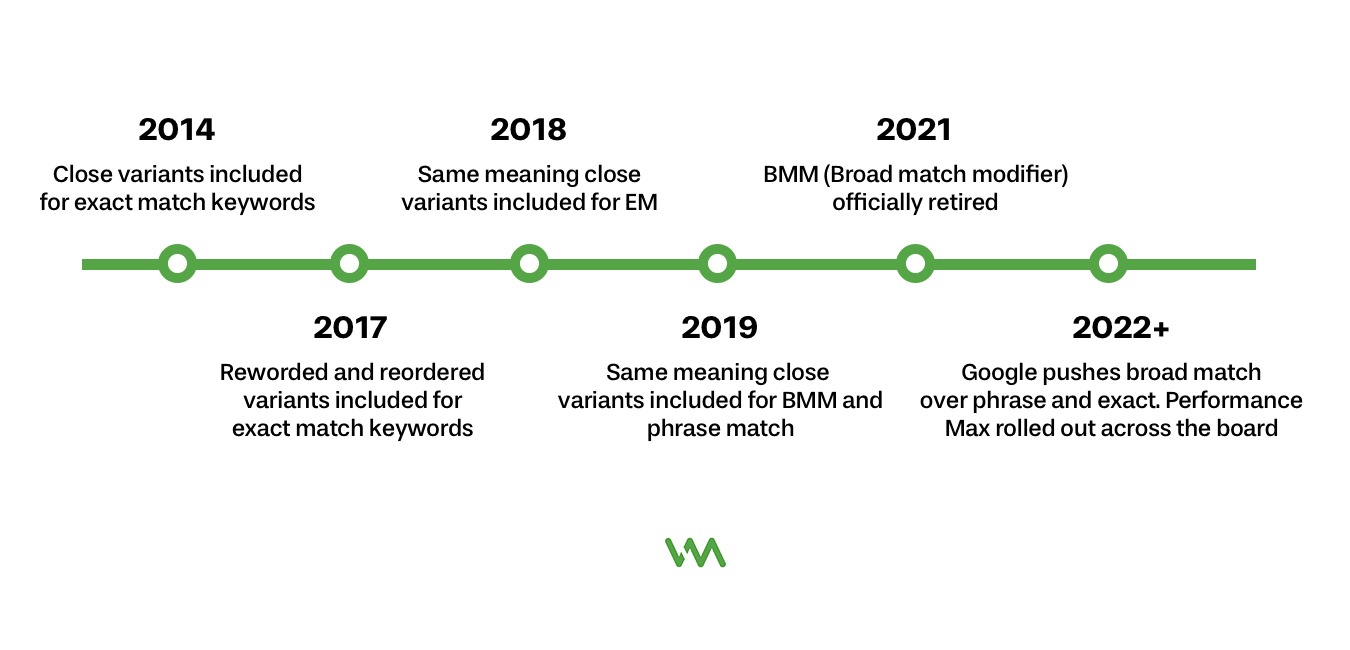
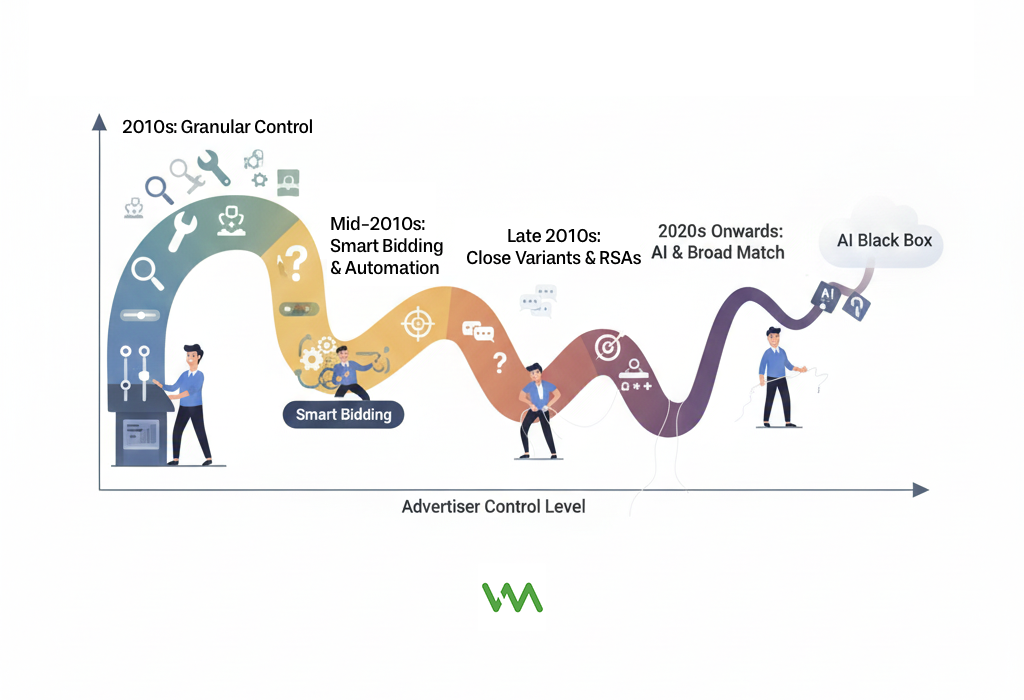
Historical context: 2015 vs. 2026 control levels shows a dramatic shift. In 2015, you could see every search term, control exact match strictly, bid manually at the keyword level, exclude specific placements, and micro-manage every aspect of your campaigns. In 2026, much of this granular control is gone, replaced by automation.
Match type expansions and close variant matching started slowly but accelerated dramatically. What began as including plurals and misspellings has expanded to synonyms, related searches, same-intent searches, and searches that include your keyword's meaning but not the actual words. Match types are now fuzzy interpretations rather than strict rules.
Reduced search terms report visibility happened in 2020 when Google started hiding "low-volume" search terms for privacy reasons. You now see only queries that met volume thresholds, meaning 20-40% of your actual search terms are completely hidden from you. You're optimizing based on partial information.
Automated campaign types like Performance Max and Smart campaigns remove nearly all control by design. You can't see placements, search terms, or optimization details. You provide goals and creative, and Google's algorithm does everything else. These campaign types are increasingly becoming the default.
Google's push toward full automation is clear in every product update. They're phasing out manual controls, pushing Smart Bidding, expanding Performance Max, and making it harder to run campaigns the old way. Their vision is advertisers setting business goals while AI handles execution.
Why Google Reduced Advertiser Control
Google has reasons for these changes - some legitimate, some business-motivated.
The machine learning argument is that AI can process millions of signals per auction and optimize better than humans. Google says advertisers shouldn't need granular control because the algorithm makes better decisions based on data we can't see or process manually. There's some truth to this - machine learning does optimize things humans can't.
Business incentives: Higher spend, more inventory align with reduced control because when advertisers can't restrict targeting as tightly, more searches qualify for ads, which means more impressions, more clicks, and more revenue for Google. Broader match types and reduced controls directly increase Google's revenue even if they don't always improve advertiser results.
The advertiser perspective: Frustration and budget waste is that reduced control often means paying for clicks that don't convert. When you can't see which searches triggered ads, you can't optimize effectively. When match types expand beyond what's relevant, you waste money on irrelevant clicks before the algorithm learns they don't convert.
Finding middle ground between control and performance is possible but requires a different approach. Instead of micromanaging inputs, you focus on outcomes. Instead of controlling every search term, you guide the algorithm with signals and exclusions. Instead of manual optimization, you create conditions where automation works well.
Understanding Match Types in 2026
Match types still exist but behave very differently than they used to.
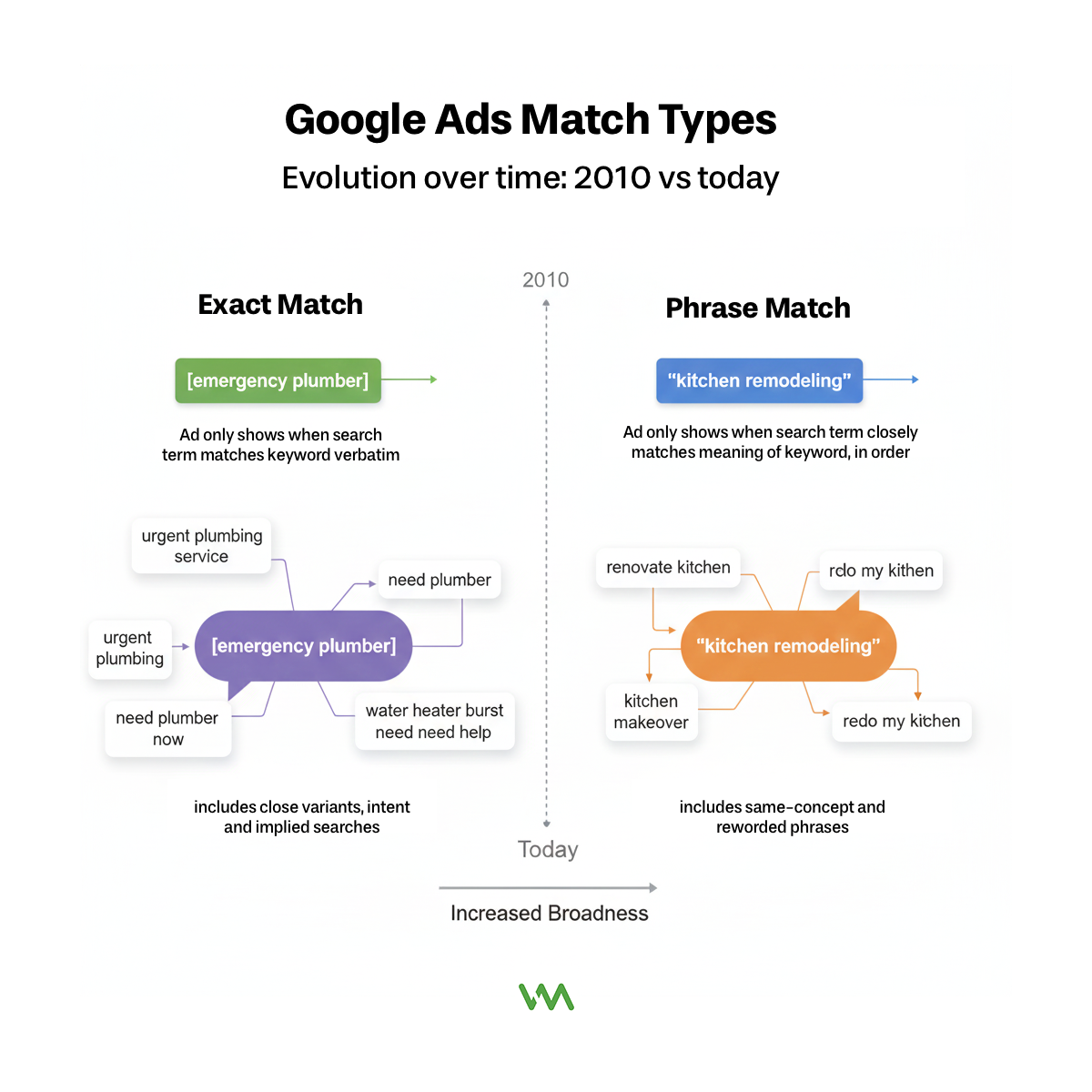
Current behavior of exact match (not very exact) includes the keyword plus close variants, plurals, misspellings, same-intent searches, and searches that imply your keyword. Exact match [emergency plumber] now shows for "urgent plumbing service," "need plumber now," even "water heater burst need help" if Google interprets the intent as matching.
Phrase match reality: close to old broad match modifier means your keyword phrase must be present in concept but not necessarily in those exact words or that order. Phrase match "kitchen remodeling" shows for "renovate kitchen," "kitchen makeover," "redo my kitchen" - much broader than pre-2021 phrase match.
Broad match with Smart Bidding is Google's preference because it gives the algorithm maximum flexibility to find converting searches. Your keyword becomes a signal about what you offer, but Google will show ads for any searches it thinks might convert based on your history. This can work brilliantly or terribly depending on your account.
How each match type interprets queries varies by account history and Smart Bidding performance. In accounts with lots of conversion data, all match types tend to expand more broadly because the algorithm is confident about finding similar searches. In new accounts, match types behave slightly more strictly.
Real examples of unexpected match behavior: We've seen phrase match "roof repair" trigger for "roofer recommendations," exact match [personal injury lawyer] show for "car accident attorney," and broad match "plumber" appear for "water heater installation" - all technically related but much broader than the keywords suggest.
The Search Terms Report: What You Can Still See
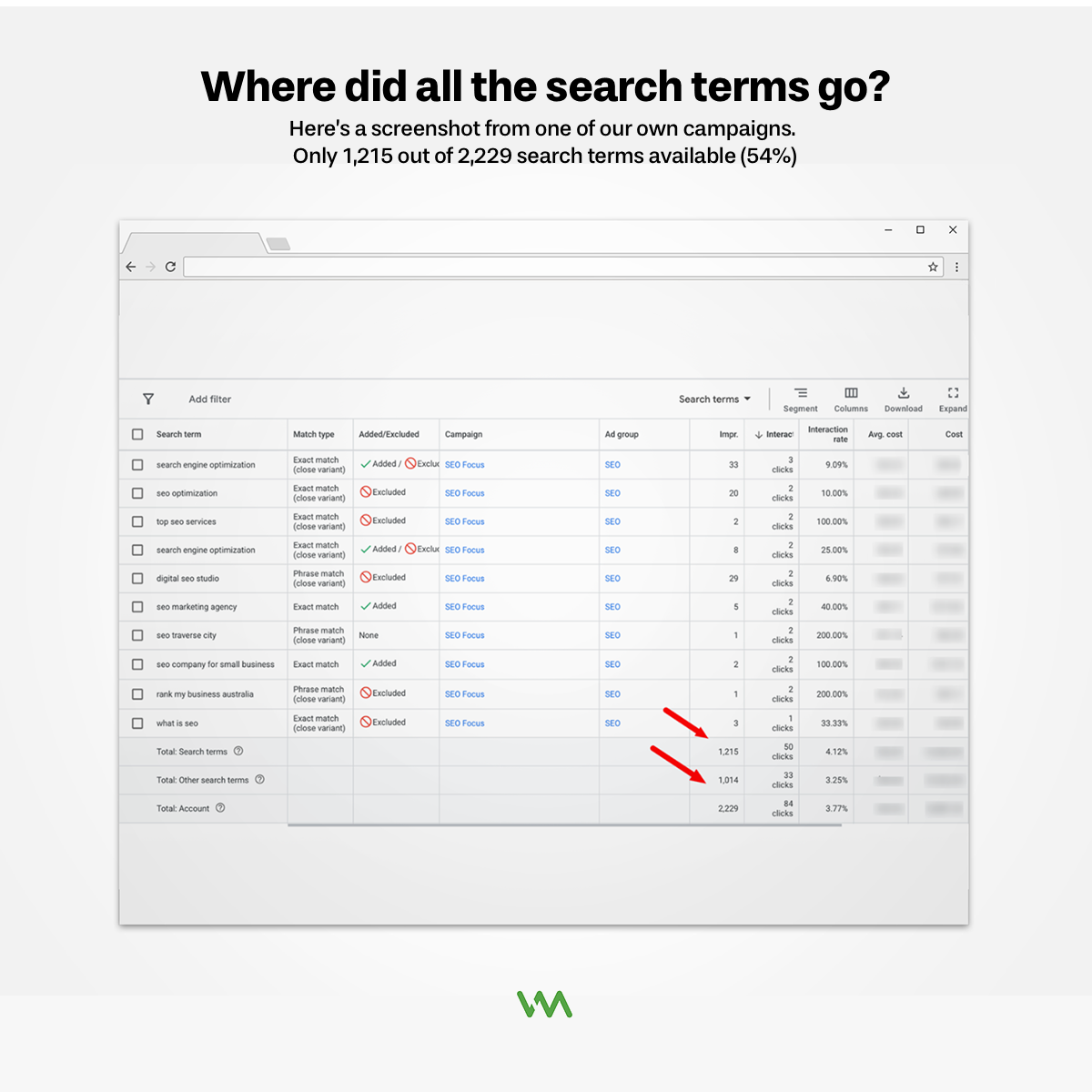
Search term visibility is limited, but not eliminated.
What Google shows you is search terms that meet minimum volume thresholds. If a search term triggered your ad multiple times or generated a conversion, you'll probably see it. One-off searches or very low-volume queries are hidden in the "other" category.
What's hidden and why is officially for "user privacy," though advertisers suspect it's also to prevent them from seeing how broadly their ads actually show. You can't see specific searches below volume thresholds, which means you're missing signals about waste or opportunity.
How to maximize insights from limited data requires looking for patterns rather than individual searches. If the searches you can see show patterns of irrelevance (lots of informational queries, job searches, competitor research), assume similar searches you can't see also exist.
Frequency of search terms review: weekly minimum ensures you catch problems before they waste too much budget. Monthly is acceptable for stable accounts, but weekly catches emergent issues faster. Set aside 30 minutes each week to review what triggered your ads.
Exporting and analyzing search terms data over time helps identify trends. Export search terms monthly, track which ones appear repeatedly, monitor which convert, and build a database of what actually drives results. This historical view reveals patterns that single reports don't show.
Building a Modern Negative Keyword Strategy
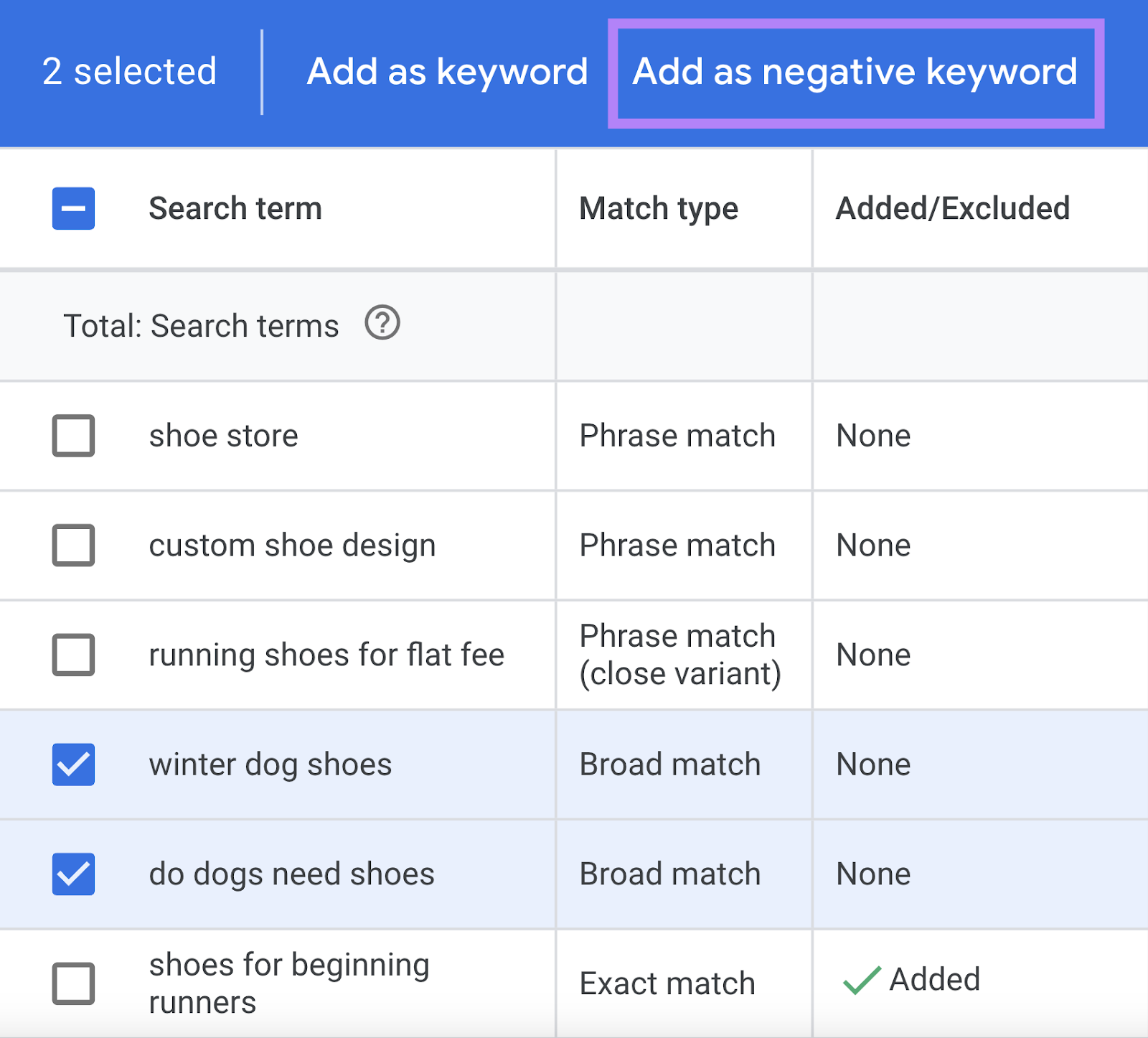
Negative keywords are more important than ever when you have less control over match types.
Why negative keywords matter more than ever is because match types are broader and you need ways to prevent waste. The algorithm should theoretically avoid non-converting searches automatically, but in practice it often tests irrelevant searches for weeks before learning they don't convert. Negative keywords prevent this waste upfront.
Account-level vs. campaign-level negatives serve different purposes. Account-level negative lists should contain universal exclusions that apply across all campaigns: jobs, careers, salary, free, DIY, how-to, resume, etc. Campaign-level negatives should be specific to that campaign but not relevant elsewhere.
Negative keyword lists and organization make management easier at scale. Create lists like "Job Searches," "DIY Intent," "Competitor Terms," "Informational Queries" and apply them to relevant campaigns. This beats adding individual negatives to every campaign manually.
The danger of over-negation with Smart Bidding is real. If you have thousands of negative keywords blocking potential traffic, you might be preventing the algorithm from finding valuable searches. With Smart Bidding, you can be less aggressive with negatives because the algorithm should reduce bids for non-converting searches automatically.
How many negative keywords is too many? There's no hard rule, but if you have 2,000+ negative keywords and you're using Smart Bidding with broad or phrase match, you might be over-negating. Focus on clear themes of irrelevance rather than blocking every tangentially related term.
Proactive Negative Keyword Research
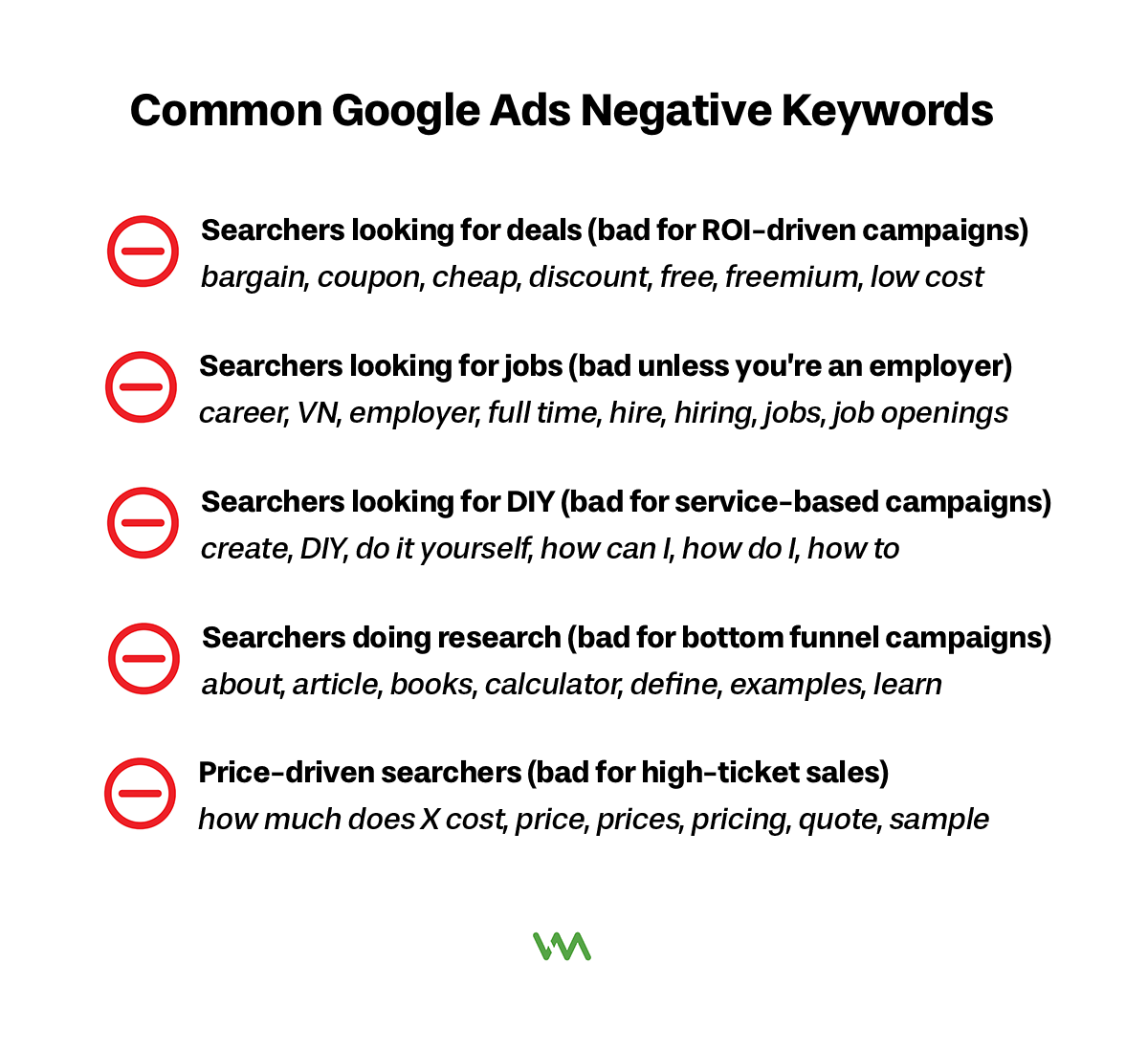
Don't just react to bad searches - prevent them proactively.
Mining search terms reports for irrelevant queries should happen during your weekly review. Look for searches that got clicks but didn't convert, searches that seem unrelated to your business, and searches that indicate wrong intent (researching vs. buying, DIY vs. hiring someone).
Common negative keywords by industry provide a starting point. Almost every business should negative keyword: free, cheap, how to, DIY, jobs, careers, salary, training, course, resume, template. Then add industry-specific terms: for contractors negative keyword "plans" and "permit," for lawyers negative keyword "pro bono" and "free consultation."
Geographic negatives prevent waste for local businesses. If you serve Detroit but not Chicago, add Chicago as a negative. If you're a regional business, negative keyword states and cities outside your service area. This prevents clicks from people you can't serve.
Career and job-related negatives waste massive budget across almost all industries. Add as negatives: jobs, careers, salary, hiring, resume, employment, training, certification, course, class, school. Unless you're actually hiring or offering training, these searches will never convert.
Informational intent negatives prevent clicks from people researching, not buying. Consider negative keywordin: how, why, what is, definition, meaning, tips, guide, tutorial, DIY, yourself. Some of these might actually convert if you have good content, but generally they indicate research phase, not buying phase.
Match Type Strategy for Maximum Control
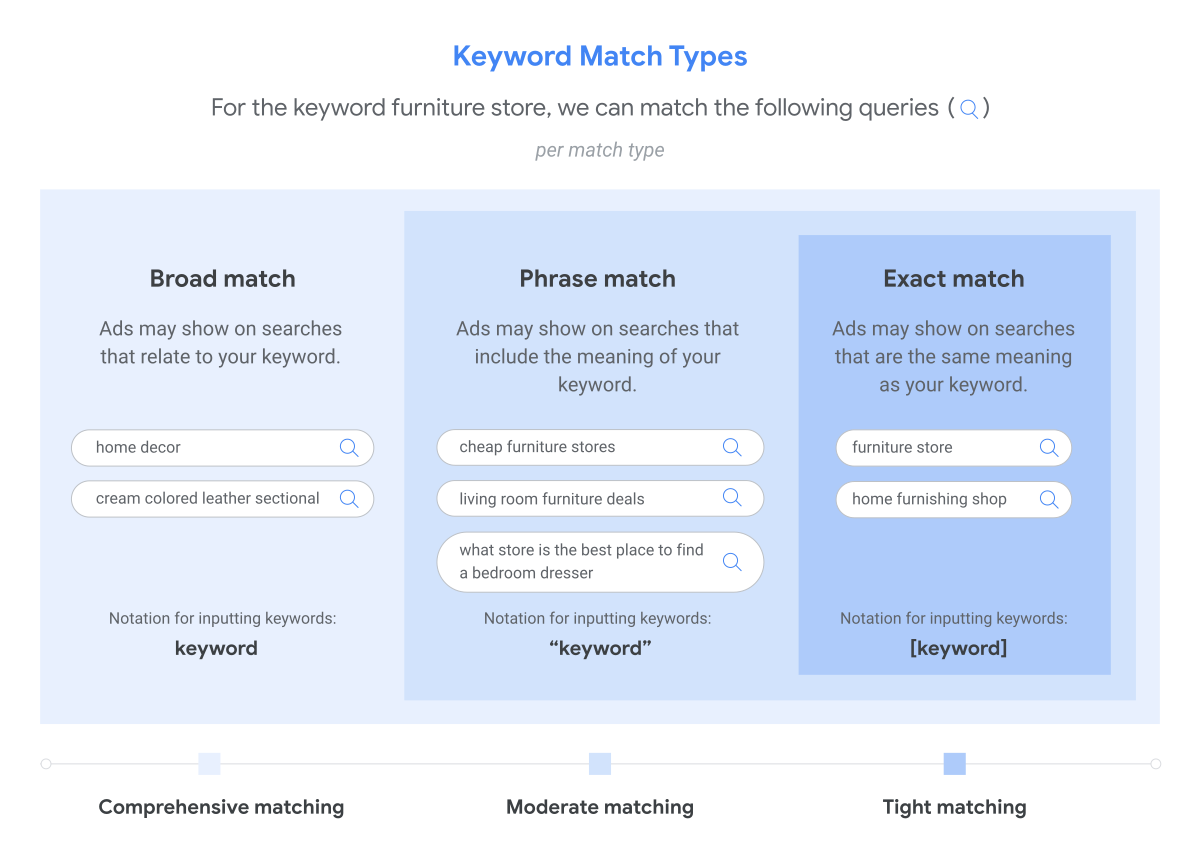
You still have some control over match types. Use it strategically.
Starting conservative: Exact and phrase match makes sense for new campaigns or limited budgets. Launch with phrase match for most keywords and exact match for your top 10-20 most important terms. This controls costs while building conversion data.
Gradual expansion to broad match once you have data and confidence. After 4-6 weeks of phrase match performance, test broad match on your best-performing keywords in a separate campaign or experiment. Compare results and expand if broad match performs well.
Match type layering within campaigns means using different match types for different keywords based on their importance. Your brand terms might be exact match for maximum control. Your primary service terms might be phrase match for balance of control and reach. Discovery terms might be broad match to capture long-tail variations.
Portfolio approach: Different match types for different goals works well. Campaign 1 uses exact match for branded and high-intent terms where you need guaranteed visibility. Campaign 2 uses phrase match for core services where you want controlled expansion. Campaign 3 uses broad match for discovery and capturing new variations.
When to use single match type campaigns is typically when testing or when you need strict budget control. If you're testing broad match performance, isolate it in its own campaign so you can clearly measure results. If you have limited budget and can't afford broad match experimentation, stick to phrase and exact.
When to Intervene vs. When to Let It Run
Knowing when to take action and when to wait is critical.
Red flags that require immediate action include: spending over budget with no conversions, sudden conversion tracking drops (suggesting broken tracking), CPC spikes of 100%+ overnight, search terms that are obviously completely irrelevant getting significant spend, or campaigns accidentally paused or incorrectly set up.
Normal fluctuations to ignore include: day-to-day performance variance (one bad day means nothing), small CPC increases of 5-10% (normal auction fluctuation), slight conversion rate changes of a few percentage points, impression share changes without clear cause, or mobile vs. desktop performance differences that are consistent over time.
The 2-week rule before making changes prevents knee-jerk reactions. Unless something is clearly broken, wait at least 2 weeks of data before making optimization decisions. Weekly performance varies, and you need enough data to distinguish signal from noise.
Statistical significance for small accounts is harder to achieve because low conversion volume means higher variance. Use online calculators to determine if performance differences are statistically significant or could be random. With 5 conversions per week, you might need 8+ weeks to confidently declare a winner in any test.
Trusting data over gut reactions means making decisions based on what the numbers show, not what you think should happen. If mobile traffic converts better than desktop in your account (even though "everyone knows" desktop converts better), trust your data and optimize accordingly.
Balancing Control with Performance
The art is finding the right level of control for your business.
The cost of too much control (missed opportunities) is that overly restrictive targeting, too many negatives, overly strict match types, and excessive segmentation can all prevent the algorithm from finding valuable traffic you're missing. Perfect control with terrible performance is still terrible performance.
When restrictions hurt your results becomes clear when you test less restrictive approaches and see improvement. If adding broad match increases conversions at acceptable costs, your previous restrictions were hurting you. If removing some negatives improves performance, you were over-negating.
Testing your assumptions about "irrelevant" traffic often reveals surprises. That search term that seems weird might actually convert. That placement you thought was wasteful might drive results. That audience you assumed wouldn't buy might become your best segment. Test before permanently excluding.
Finding your account's optimal control level requires experimentation. Some accounts perform best with tight control (small budgets, niche services). Others perform best with loose control (large budgets, broad appeal). Test different levels of control and measure business results, not just comfort level.
Philosophy: Control outcomes, not inputs shifts your mindset from "I need to control every search term and bid" to "I need to achieve X cost per lead and Y lead quality." Focus on results, and be flexible about how you get there.
Working with Your Agency on Traffic Control
Make sure your agency is using available controls appropriately.
Questions to ask about traffic quality include: What search terms are triggering our ads? What percentage of clicks come from Search vs. Display vs. YouTube? What's our bounce rate and conversion rate by traffic source? Are we seeing irrelevant searches getting significant spend? How often are you reviewing and adding negative keywords?
Requesting search terms reports and analysis should happen at least monthly in your review calls. Ask to see actual search terms, what's converting, what's wasting budget, and what negatives they've added. If they can't show you this analysis, they're not doing their job.
Understanding their negative keyword strategy means asking how they decide what to negative keyword, how they organize negative keyword lists, whether they're using account-level lists for efficiency, and how they balance negative keywords with letting Smart Bidding learn.
When to push back on "trust the algorithm" is when performance is poor and they're not explaining why or not making changes. "Trust the algorithm" is valid when performance is good and they're providing data to support it. It's not valid as an excuse for not optimizing or not providing transparency.
Red flags: Agency not reviewing search terms is inexcusable. If your agency isn't regularly reviewing what searches trigger your ads, adding negatives, and optimizing based on search term performance, they're not managing your account properly. This is basic blocking and tackling.
You Have Less Control, But Not Zero Control
Here's the reality: you can't micromanage Google Ads like you could five years ago. The platforms have changed, automation has taken over many optimization tasks, and granular control has been intentionally reduced.
But you're not powerless. Strategic use of negative keywords, match type selection, audience signals, content exclusions, geographic targeting, ad scheduling, and campaign structure all give you ways to guide where your budget goes and prevent waste.
The key is accepting that control looks different now. You're not controlling every individual search term and bid. You're creating conditions where automation performs well: good tracking, smart exclusions, appropriate match types, quality signals, and strategic structure.
Focus on outcomes and lead quality, not micromanagement. Measure success by whether you're acquiring customers at acceptable costs, not by whether you understand every detail of how the algorithm operates.
If you want help optimizing your campaign controls to balance automation with strategic guidance, schedule a consultation with our team. We'll audit your current traffic quality and recommend specific controls that will improve performance without fighting the algorithm.
