


Understanding Server-Side Tagging: Because Your Data Is Probably More Broken Than You Think
If you're running paid ads right now, you're probably making decisions based on data that's anywhere from 30-50% incomplete. That's not a typo. Between ad blockers, iOS privacy updates, and browsers getting increasingly aggressive about blocking tracking scripts, nearly half your conversions might be invisible to your advertising platforms.
For years, we've all been using what's called "client-side tagging" - the traditional way of tracking website visitors. You load up your Google Analytics tag, Facebook Pixel, maybe a few other scripts, and call it a day. These tags fire directly in your visitor's browser and send data back to the platforms.
It worked great. Until it didn't.
What the hell is server-side tagging, anyway?
Here's the simplest way to understand it: instead of loading a bunch of tracking scripts that run in your customer's browser (where they can be blocked), you run one lightweight script that sends data to your own server first. Your server then processes that data and forwards it to Google, Facebook, and whatever other platforms you're using.
Think of it like this - client-side tagging is like having ten different messengers standing in your customer's living room, all shouting information back to their respective companies. Server-side tagging is having one quiet messenger in your office who collects the information and then sends it out on your terms.
The difference? Your one messenger doesn't get kicked out by ad blockers. And your customer's experience isn't slowed down by all those messengers crowding their space.
Why this matters for your business (even if you're not spending six figures on ads)
You're making decisions with incomplete data
Remember that Meta Ads overreporting issue we wrote about? That was just one side of the coin. The bigger problem is underreporting due to tracking loss. When Safari blocks your Facebook Pixel, Meta has no idea that conversion happened. Their algorithm thinks your campaign is failing when it might actually be your best performer.
You're essentially flying blind, making budget decisions based on data that's missing anywhere from 30-50% of the actual conversions. That's not a small margin of error - that's driving your business off a cliff while reading a broken speedometer.
Your site speed is probably hurting conversions
Every tag you add to your website makes it slower. We've seen sites loading 15+ different tracking scripts before the page even fully renders. Each one of those scripts is a speed bump between your customer and their purchase.
Here's the math: a one-second delay in page load time can reduce conversions by 7%. If you're spending $10,000/month on ads to drive traffic to a slow website, you're literally paying to send people to a worse experience. Server-side tagging moves all that processing off your customer's device and onto your server, where they can't feel it.
You actually own your data
With traditional tagging, data flows directly from your customer's browser to Facebook, Google, TikTok, whoever. You're basically a bystander. Server-side tagging puts you in the middle of that transaction. You see everything first, you decide what gets shared, and you can filter out sensitive information before it leaves your server.
This isn't just about control - it's about compliance. GDPR, CCPA, and whatever privacy regulations come next all become easier to manage when you're actually in control of your data flow.
The platforms optimize better when they have better data
When Facebook is missing 40% of your conversions, their algorithm is making decisions with garbage data. They might be shutting off your best-performing ad sets because they can't see the full picture. With server-side tagging bypassing most blockers, you're feeding the algorithm more complete data. Better data in = better optimization out = better return on your ad spend.
This isn't going away
Third-party cookies are dying. Browsers are getting more aggressive about privacy. The tracking landscape we've relied on for the past decade is fundamentally changing. Server-side tagging isn't a nice-to-have anymore - it's the direction everything is moving.
You can either set this up now when you have time to do it right, or scramble to figure it out later when you suddenly can't track half your conversions.
Setting up Server Side Tagging Isn’t That Complicated
Tools like Stape.io have made this accessible to businesses that don't have a full development team on payroll. What used to require serious technical infrastructure and expertise can now be set up with a step-by-step process.
Is it still technical? Yeah. But it's the kind of technical that's worth figuring out because the alternative is continuing to make business decisions based on broken data.
Ready to actually see what's happening with your marketing? Let's walk through how to set this up.
Step-by-Step Guide on Setting Up SST via Stape.io
Step 1: Create the Gateway
Log in to stape.io and open (or create) your Stape container.
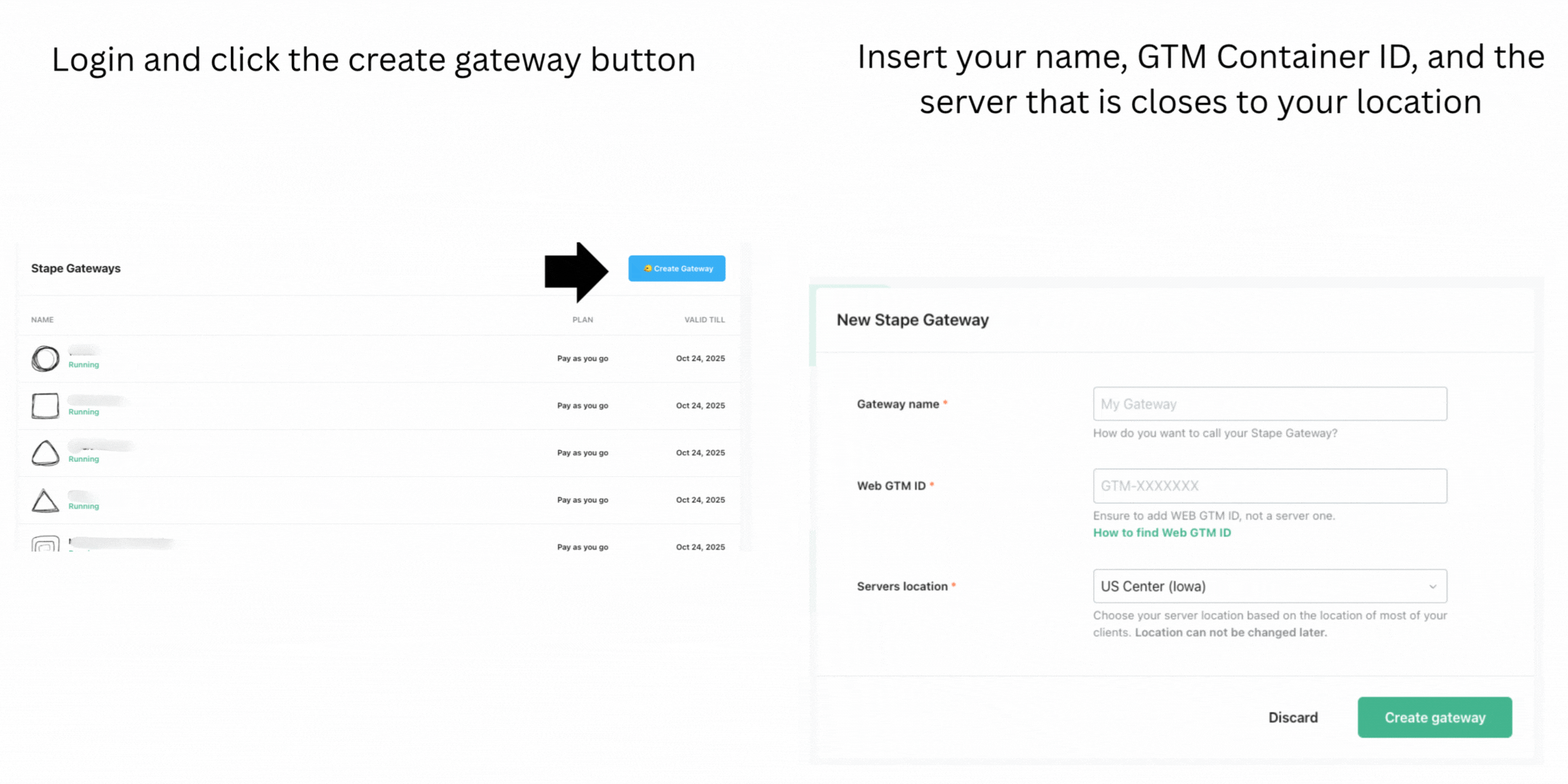
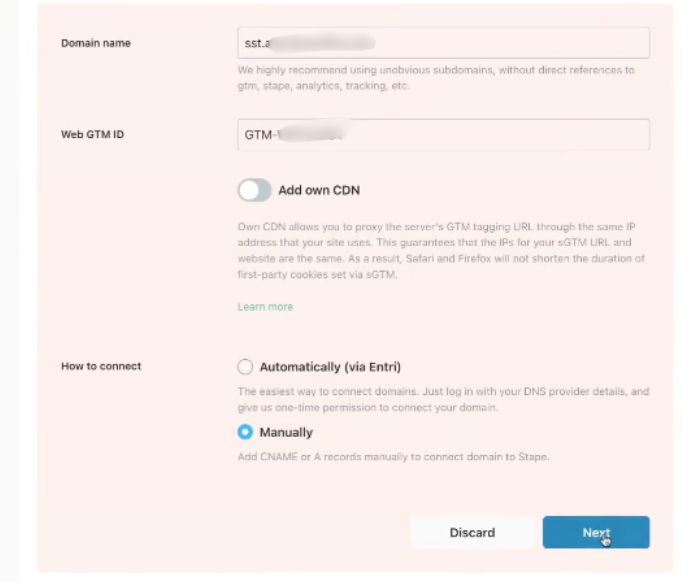
Step 2: Set Up Your Subdomain/DNS Manual
Use a clean subdomain, such as track.yourdomain.com (or gtm.yourdomain.com). Stape supports both global and its own CDN modes; pick the one that fits your stack. Stape.io will tell you which DNS records to add to your domain.
In this example, we used “sst” (i.e. sst.yourdomain.com)
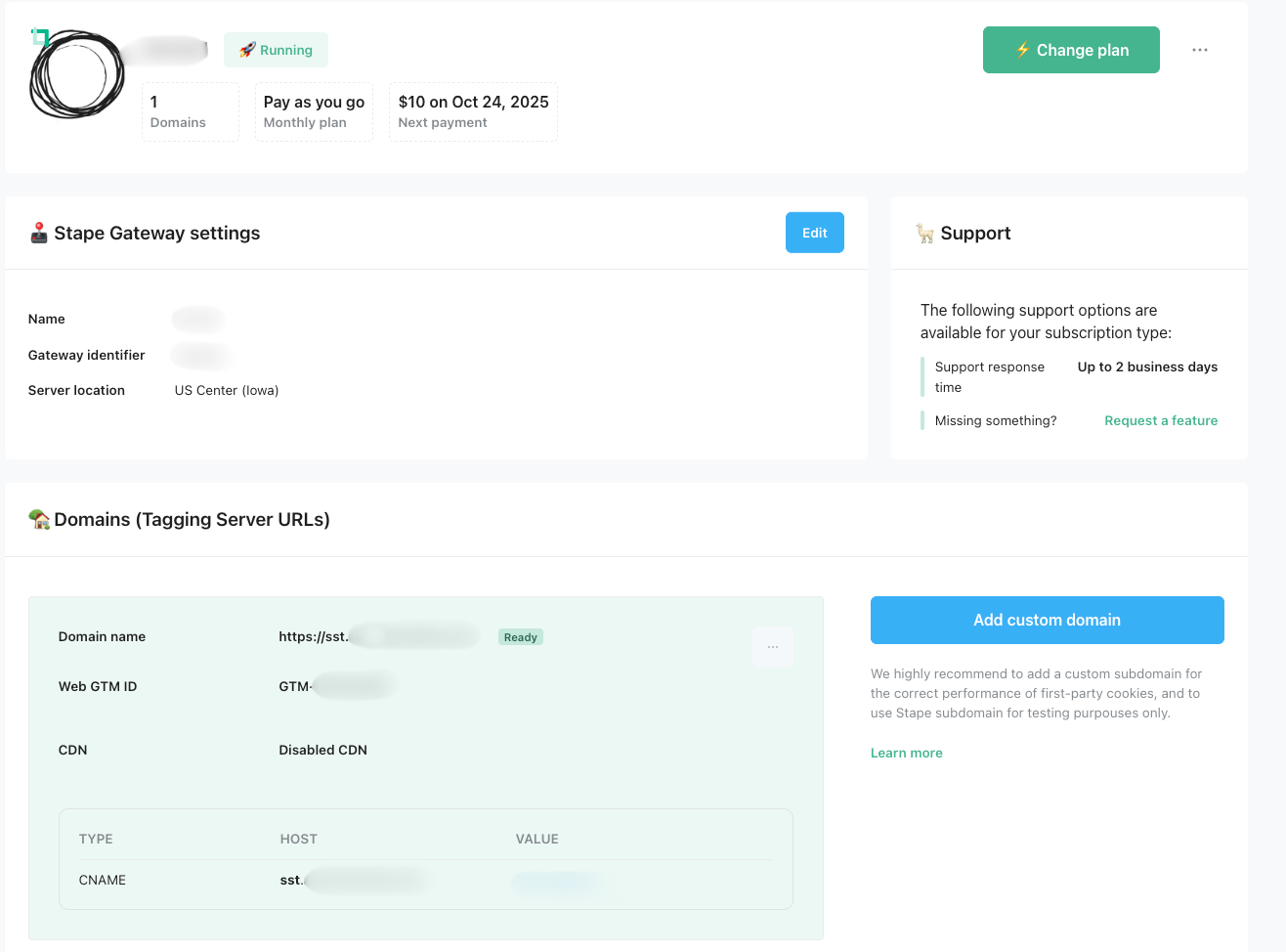
Step 3: Validate Your DNS & Subdomain
When ready, the box will change from red to green.
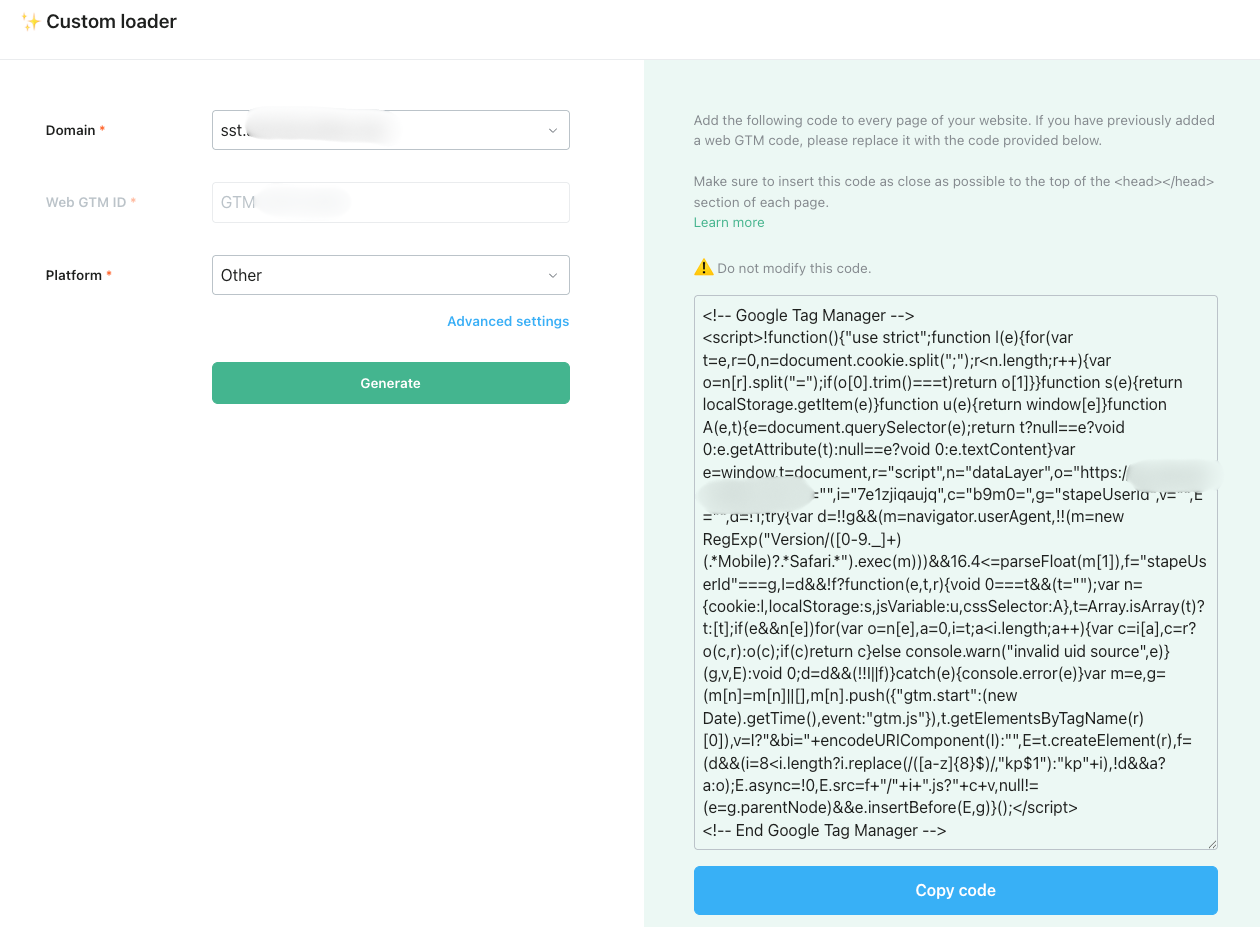
Step 4: Enable the Custom Loader (rewrites GTM/gtag to your domain)
In your Stape container → Custom Loader → Configure.
Stape will generate a modified Web GTM/gtag snippet that points to your domain. Please select which platform you need. Copy it.
Step 5: Install the modified GTM/gtag snippet on your site
Replace your current GTM Web snippet with the Custom Loader snippet Stape provided (same places: <head>). Then, publish your site changes.
You don’t have to retag everything in GTM. The loader routes Google tags (and supported resources) via your new first-party subdomain.
Step 6: Verify Your Setup
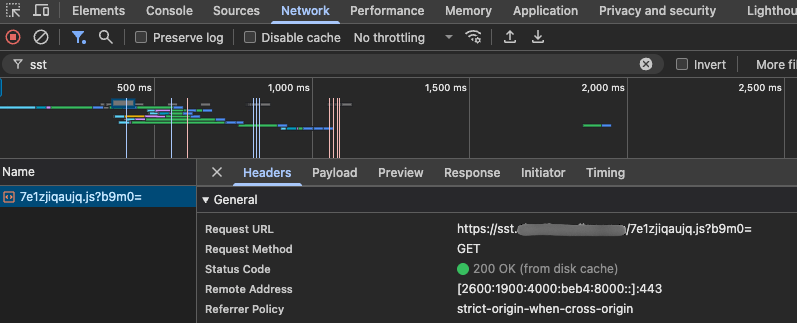
Using the same method we used to collect our variables, please use the Inspect tool and Browser Network tab. Load a tagged page and look for GTM/collect requests going to track.yourdomain.com.
Modernize Your Tagging & Recover Lost Data
Traditional client-side tracking is missing 30-50% of conversions due to ad blockers and browser privacy features, causing businesses to make decisions with incomplete data. Server-side tagging solves this by routing tracking through your own server instead of visitors' browsers—bypassing blockers, improving site speed, and giving you control over data flow. This means ad platforms like Meta and Google receive more complete conversion data, leading to better algorithm optimization and ROAS. With third-party cookies dying and privacy regulations tightening, server-side tagging is becoming essential. Tools like Stape.io have made setup accessible without requiring a full development team.
