

The $20,000 lesson
Last month, one of our clients called me, frustrated. Their Google Ads dashboard was showing 150 leads at a cost per lead of $45. Not bad, right? They were pumped. Their sales team? Not so much.
Turns out, only 12 of those 150 leads ever answered the phone. Of those 12, exactly 3 became customers. That's a real cost per customer of $2,250 - not $45.
Here's the kicker: Google's algorithm had no idea. As far as Google knew, all 150 leads were created equal. The campaign kept optimizing for more of the same junk leads, burning through budget like a house fire.
This is what happens when you don't close the loop.
What is closed-loop revenue tracking, anyway?
If you're running lead generation campaigns on Google Ads or Meta, you're probably tracking form submissions, phone calls, or button clicks. That's great - it tells you that something happened. But it doesn't tell you what happened after.
Closed-loop revenue tracking means feeding actual business outcomes back into your advertising platforms. It's the difference between telling Google "someone filled out a form" and telling Google "someone filled out a form, became a customer, and spent $5,000."
Most businesses stop at the form submission and call it a day. The problem is, your ad platforms don't know which leads turned into revenue and which ones went straight to the spam folder. Without that critical information, they can't optimize for what actually matters: customers, not just clicks.
The algorithm shift nobody's talking about
Here's something that's changed dramatically in the past few years: Google and Meta have moved away from interest-based targeting and toward conversion-based optimization.
In the old days, you could tell Google "show my ads to people interested in plumbing services" and the algorithm would find those people based on their browsing behavior. Now? The algorithms care way more about who actually converts based on the conversion signals you send them.
Think of it like hiring a salesperson. If you never tell them which pitches actually closed deals, they'll just keep doing whatever they think works. They might get really good at booking meetings that go nowhere, because that's the only metric you're measuring.
Your Google Ads and Meta campaigns are the same way. If you're only telling them "this person submitted a form," they'll optimize for more form submissions - good, bad, and downright terrible. But if you tell them "this person submitted a form and spent $10,000 with us," now the algorithm can start finding more people like that.
This is why closed-loop tracking isn't just nice to have anymore. It's foundational to running profitable campaigns in 2025.
The four pillars of a closed-loop system
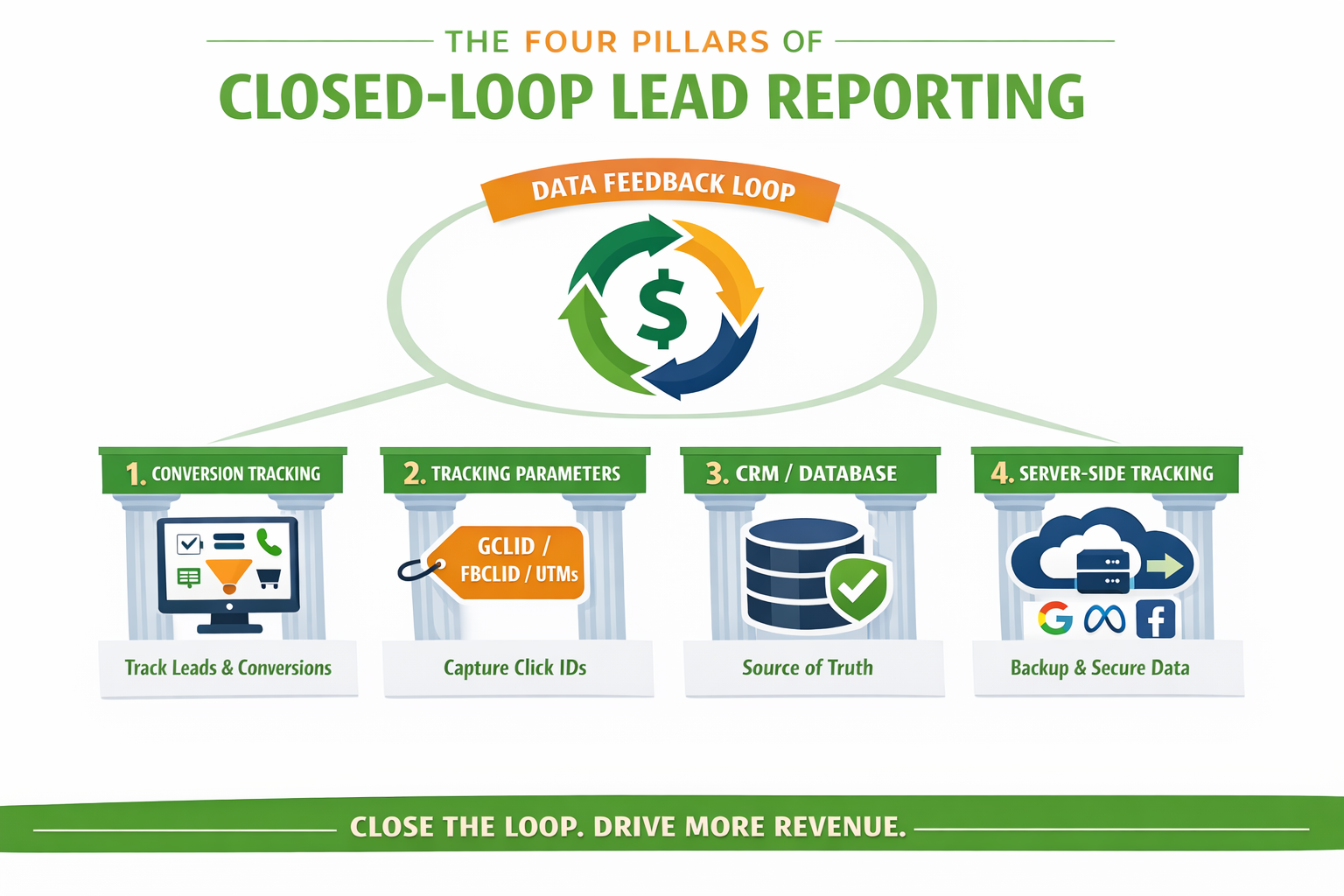
Building a closed-loop revenue tracking system doesn't require a six-figure tech stack or a team of developers. It does require four core components working together.
1. Proper conversion tracking (the foundation)
Everything starts with accurate conversion tracking. If this part is broken, the rest doesn't matter.
You need more than just a "form submitted" event. You need to be tracking multiple stages of the customer journey - form submissions, phone calls, scheduled appointments, and ultimately, purchases or signed contracts.
Here's what proper tracking looks like:
- Google Ads: Conversion actions with Enhanced Conversions set up for each meaningful step (form, call, purchase)
- Meta Ads: Pixel installed with standard events (Lead, Purchase) and custom events where needed
- Value-based tracking: Passing actual dollar amounts when possible, not just counting events
- Dynamic values: Using conversion value rules in Google Ads to assign different values to different types of leads
The goal is to give the algorithm as much signal as possible about what actions lead to revenue.
2. Tracking parameters (the connector)
This is the piece most people forget, and it's what actually connects an ad click to a conversion.
When someone clicks your ad, you need to capture identifying information that follows them through their entire journey. For Google Ads, this is the GCLID (Google Click ID). For Meta, it's the FBCLID (Facebook Click ID). You should also be using UTM parameters to track campaign, source, and medium.
Here's what needs to happen:
- Your landing pages must be set up to capture these parameters - most form builders and CRMs can do this automatically, but you need to configure it
- The click IDs need to be stored with the lead data - in a hidden form field or passed to your CRM
- These IDs are what allow you to upload offline conversions later - without them, you can't tell Google which ad click led to which sale
If you're not capturing GCLIDs and FBCLIDs with every form submission and phone call, you can't close the loop. Period.
3. Your CRM or spreadsheet (the source of truth)
This is where the magic happens - and where most businesses drop the ball.
Your CRM (or spreadsheet, if you're just getting started) is the single source of truth for what happened to those leads. Did they become customers? How much did they spend? How long did it take to close them?
Don't have a fancy CRM? A Google Sheet works fine. Seriously. Here's what you need to track:
- Lead source (Google Ads, Meta, organic, etc.)
- GCLID or FBCLID (this is critical!)
- Lead contact info
- Date of inquiry
- Lead status (contacted, qualified, customer, dead)
- Revenue amount (if closed)
- Date closed
- Time to close
Every time someone fills out a form or calls, add a row. Every time someone becomes a customer, update that row with the revenue and closed date. This simple tracking gives you the data you need to close the loop.
Pro tip: Make sure your sales team is actually updating lead statuses. A closed-loop system only works if the data is accurate. If your CRM says a lead is "open" but they actually became a customer 3 months ago, you're feeding the algorithm bad data.
4. Server-side tracking (the insurance policy)
Browser-based tracking (pixels, tags, cookies) used to be enough. Not anymore.
iOS updates, browser privacy features, and ad blockers are making browser-based tracking increasingly unreliable. We've seen conversion tracking gaps of 30-40% on some accounts due to these privacy changes.
Server-side tracking solves this by sending conversion data directly from your server to ad platforms, bypassing the browser entirely. Think of it as insurance - when browser tracking fails, server-side picks up the slack.
For Google Ads, this means setting up enhanced conversions or Google Tag Manager server-side containers. For Meta, it's the Conversions API (CAPI).
You don't necessarily need this on day one, but if you're spending more than $5,000/month on ads, it's worth implementing. Tools like Stape.io, Segment, or Google Tag Manager Server-Side make this more accessible than it used to be.
The feedback mechanism (closing the loop)
Once you have these four pillars in place, you need the actual mechanism to send data back to your ad platforms. This is what makes it a "closed loop" instead of just good recordkeeping.
There are a few ways to do this:
Offline conversion imports: Upload a CSV with GCLID/FBCLID, conversion time, and conversion value. This can be manual (monthly uploads) or automated (via API or Zapier).
Enhanced conversions: Google matches hashed customer data (email, phone, address) to ad clicks, even without GCLID. This is especially useful for phone calls where GCLID tracking is harder.
Conversions API for Meta: Send conversion data directly from your server to Meta, with FBCLID and event data.
CRM integrations: Many CRMs (HubSpot, Salesforce, Zoho) have native integrations with Google Ads and Meta that can automatically sync conversion data.
The method you choose depends on your business size, technical capabilities, and budget - but the goal is the same: telling Google and Meta which leads turned into revenue, so they can find more people like that.
Real-world closed-loop examples
Let's look at how this actually works in practice, from simple to sophisticated.
The simple version: Google Ads → Google Sheets → Manual upload
A local law firm we work with gets 30-50 leads per month. They track everything in a Google Sheet:
- When a lead comes in from Google Ads, it includes a Google Click ID (GCLID)
- Their office manager updates the sheet when leads become clients
- Once a month, we upload the closed deals back to Google Ads using the offline conversion import feature
Total implementation time: 2 hours. Monthly maintenance: 15 minutes. The result? Their cost per customer dropped 34% in 90 days because Google finally knew which leads were actually worth pursuing.
The automated version: Google Ads → Zapier → CRM → Automated feed
A plumbing company doing $2M annually needed something more automated. Here's their setup:
- Form submissions and calls are logged in their CRM (ServiceTitan)
- When a job is marked as "sold" in the CRM, Zapier catches it
- Zapier sends the conversion data back to Google Ads automatically
- No manual uploads needed
This setup costs them about $50/month for Zapier and took a developer about 4 hours to configure. Now their campaigns optimize for actual jobs sold, not just phone calls that go nowhere.
The enterprise version: Full API integration
For clients spending $50,000+ monthly on ads, we build custom integrations:
- CRM and ad platforms connected via API
- Real-time conversion data flowing both directions
- Advanced attribution models tracking multi-touch journeys
- Automated value updates as customer lifetime value grows
One client saw their return on ad spend increase from 4.2x to 6.8x within 6 months after implementing full closed-loop tracking. The algorithm learned to find high-value customers instead of just anyone willing to fill out a form.
Popular tools and software for closed-loop tracking
The good news is you don't have to build everything from scratch. There are dozens of tools designed specifically to help you close the loop on your marketing data. Here's a breakdown of the most popular options, organized by what they're best for.
Call tracking platforms (best for lead gen businesses)
If you're a service business that relies heavily on phone calls, these tools are purpose-built for you:
CallRail (Starting at ~$45/month)
The most popular call tracking platform for small to medium businesses. CallRail tracks phone calls, forms, and texts, and attributes them back to specific campaigns and keywords. It's easy to set up and integrates with Google Ads, Meta, and most major CRMs. The downside? Call and form data live in separate dashboards, so you don't get a truly unified view of your leads.
WhatConverts (Starting at ~$30/month)
Similar to CallRail but with better multi-channel attribution. WhatConverts tracks calls, forms, chats, and e-commerce transactions all in one unified dashboard. It's particularly strong for agencies managing multiple clients and offers better API access for custom integrations. We use this extensively at Verde Media and mentioned it in our Meta Ads overreporting article.
Invoca (Enterprise pricing)
Built for larger companies with high call volume. Invoca focuses on AI-powered conversation intelligence and advanced call attribution. It's overkill for most small businesses but powerful for enterprises that need deep insights into phone conversations.
CallTrackingMetrics (Starting at ~$49/month)
An all-in-one communications platform that combines call tracking with contact center features. Good for businesses that need both marketing attribution AND a full phone system with call routing, IVR, and softphone capabilities.
Multi-channel attribution platforms
These tools go beyond just call tracking to give you a complete picture across all marketing channels:
Ruler Analytics (Starting at ~$199/month)
One of the best closed-loop attribution platforms for B2B companies. Ruler tracks website visitors, calls, forms, and live chat, then connects all that data back to your CRM to show which marketing channels drive actual revenue. It's particularly strong for businesses with long sales cycles.
Hyros (Starting at ~$499/month)
Built specifically for online advertisers running aggressive paid campaigns. Hyros uses AI to track every touchpoint in the customer journey and attributes revenue back to the exact ad, keyword, and creative that drove it. Popular with e-commerce brands and info product sellers spending $50K+/month on ads.
Cometly (Starting at ~$50/month)
A newer player that's gaining traction fast. Cometly specializes in server-side attribution and Conversion API tracking to bypass browser-based tracking limitations. It's designed for performance marketers who need accurate attribution in the post-iOS 14.5 world.
Dreamdata (Starting at ~$999/month)
Built specifically for B2B SaaS companies. Dreamdata integrates with your CRM and marketing tools to map the full customer journey from anonymous visitor to closed deal. It's expensive but powerful for companies with complex, multi-touch B2B sales cycles.
E-commerce specific tools
If you're running an online store, these platforms are optimized for e-commerce attribution:
Triple Whale (Starting at ~$129/month)
The most popular attribution platform for Shopify stores. Triple Whale consolidates data from all your ad platforms (Google, Meta, TikTok, etc.) and shows you real-time profitability metrics. Great for e-commerce brands doing $50K-$5M/month in revenue.
Northbeam (Starting at ~$500/month)
Premium attribution for serious e-commerce advertisers. Northbeam uses machine learning to provide more accurate multi-touch attribution than native platform reporting. It's expensive but worth it for brands spending $100K+/month on ads.
All-in-one marketing platforms
These platforms include closed-loop attribution as part of a larger marketing suite:
HubSpot Marketing Hub (Professional starts at ~$800/month)
If you're already using HubSpot CRM (which is free), the Marketing Hub includes built-in attribution reporting. You can see exactly which campaigns, channels, and content pieces drove deals. The attribution isn't as sophisticated as dedicated tools, but for many businesses, it's "good enough" and one less tool to manage.
Salesforce with Pardot (Starting at ~$1,250/month)
The enterprise standard for B2B marketing automation and attribution. Salesforce + Pardot can track the entire customer journey from first touch to closed-won deal. It's powerful but requires serious implementation effort and budget.
Google and Meta native solutions
Don't forget that both Google and Meta have built-in tools for closing the loop:
- Google Ads Offline Conversion Imports - Completely free. Upload a CSV with your GCLIDs and conversion data, and Google will attribute those conversions back to the right campaigns. It's manual but functional.
- Google Ads Enhanced Conversions - Also free. Uses hashed customer data (email, phone) to match offline conversions to ad clicks. More automated than offline imports once set up
- Meta Conversions API (CAPI) - Free to implement (though you need server-side setup). Sends conversion data directly from your server to Meta, improving attribution accuracy and getting around browser tracking limitations.
The cost of waiting
Here's what keeps me up at night: every day you run campaigns without closed-loop tracking is another day of bad data poisoning your algorithms.
Google and Meta's machine learning models have long memories. If you've been training them on junk leads for months or years, it's going to take time to correct course once you implement proper tracking. We typically see it take 30-60 days for algorithms to adjust after implementing closed-loop tracking - and that's 30-60 days of potentially wasted spend while they relearn.
Your competitors who already have this figured out? They're getting smarter every day. Their algorithms know what a good customer looks like. Yours are still guessing.
And let's talk about attribution windows. Google Ads typically looks at the last 30-90 days of data. Meta looks at 7 days. If you wait another 6 months to implement closed-loop tracking, you're essentially starting from scratch. All that historical data about what worked? Gone.
Want help setting this up for your business? That's literally what we do all day. Schedule a call with our team, and we'll walk you through exactly what you need.
