


The Campaign Type That Took Over Google Ads
Last month, I was reviewing one of our client accounts when I noticed something strange. Their Google Ads performance had suddenly improved—significantly. ROAS was up 35%, cost per conversion was down 40%, and they were getting more leads than ever before. The weird part? We hadn't touched their campaigns in weeks.
After digging into the account, I discovered the culprit: a Performance Max campaign that our team had quietly launched as a test a few months earlier. While we'd been focused on optimizing their search and display campaigns, this automated campaign had been steadily learning, improving, and eventually outperforming everything else in the account.
This scenario is playing out across thousands of Google Ads accounts right now. Performance Max campaigns, or "PMax" as they're commonly called, have become Google's not-so-secret weapon for driving results while requiring less day-to-day management from advertisers.
If you're running Google Ads and haven't heard about Performance Max campaigns yet, you're not alone. Google rolled them out gradually, and many agencies are still figuring out how to use them effectively. But here's the thing: whether you love them or hate them, Performance Max campaigns are quickly becoming the dominant campaign type in Google Ads.
In this guide, we'll break down everything you need to know about Performance Max campaigns, how they differ from traditional Google Ads campaigns, and most importantly, how to set them up for success in your business.
What is Performance Max? (The Basics Your Agency Should Have Explained)
Think of Performance Max as Google's attempt to create the "easy button" for advertising. Instead of you choosing where your ads appear, who sees them, and when they run, Google's machine learning algorithms make all those decisions for you.
Here's the simple version: You give Google your ads (headlines, images, videos), tell it what action you want people to take (buy something, fill out a form, call your business), set a budget, and Google figures out the rest. Your ads can appear across Google's entire network—Search results, YouTube videos, Gmail inboxes, websites, Google Maps, and more.
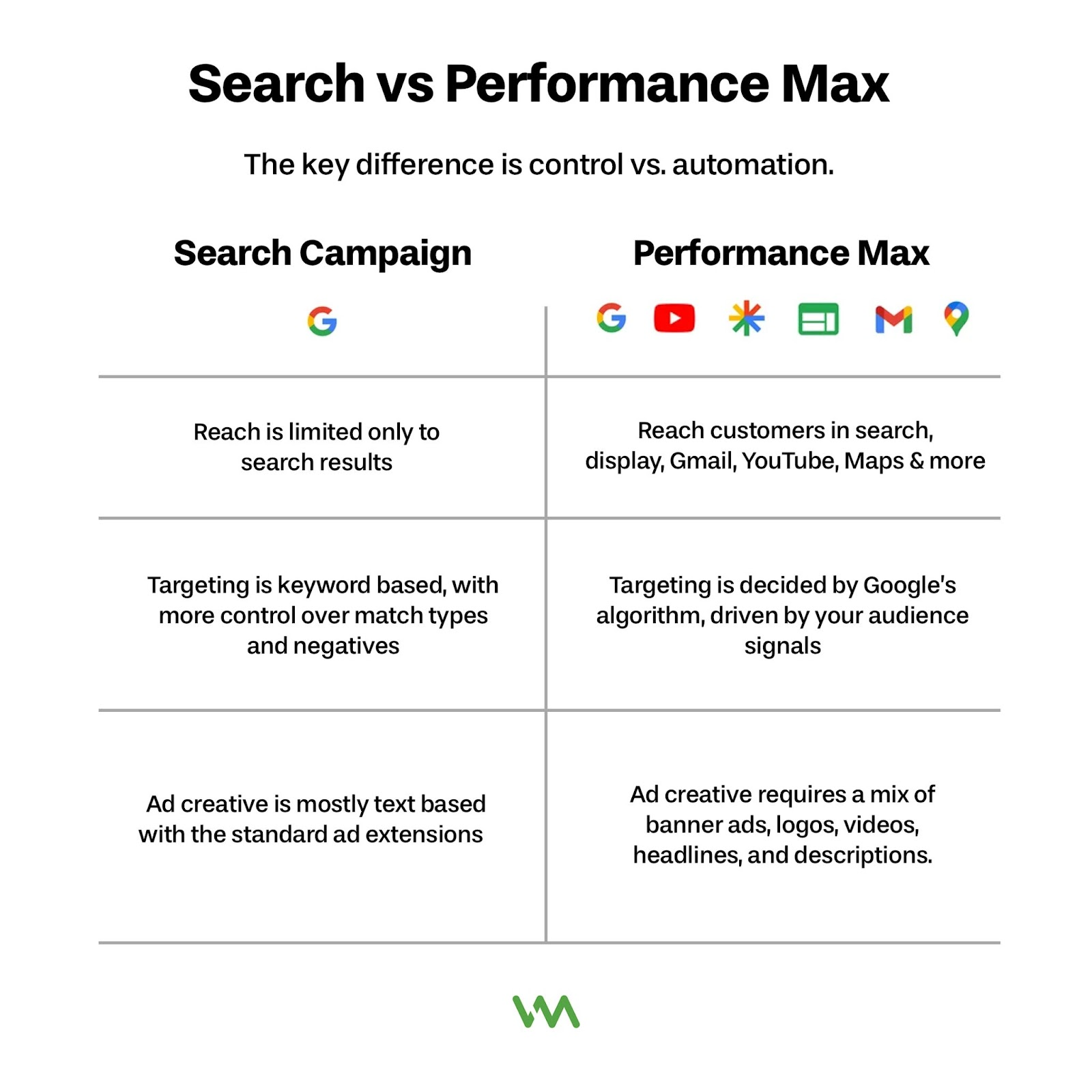
Traditional Campaign Structure:
- Search Campaign: You pick keywords → Google shows ads in search results
- Display Campaign: You choose websites → Google shows ads on those sites
- YouTube Campaign: You target audiences → Google shows video ads on YouTube
- Shopping Campaign: You upload products → Google shows product ads in search
Performance Max Structure:
- PMax Campaign: You provide assets → Google shows ads everywhere it thinks they'll work
The key difference is control versus automation. Traditional campaigns give you granular control over where, when, and how your ads appear. Performance Max asks you to trust Google's algorithms to make those decisions based on your goals and the data it collects.
Why did Google create Performance Max? Officially, it's to help advertisers reach more customers with less effort. Unofficially, it's because Google wants to automate more of the advertising process, reduce the complexity that scares away small businesses, and ultimately serve more ads across their entire ecosystem.
How Performance Max Differs from Everything Else You Know
The biggest mental shift with Performance Max is giving up control. If you're used to traditional Google Ads campaigns, this can feel uncomfortable at first.
Goodbye Control, Hello Automation
Search Campaigns: You research keywords, write ads, set bids, and choose when your ads appear. You have complete control over the customer journey from search query to click.
Performance Max: You provide Google with your business goals and creative assets. Google's algorithms decide which searches, websites, videos, and audiences are most likely to convert, then automatically shows your ads there.
Display Campaigns: You select specific websites, topics, or audiences where you want your banner ads to appear. You can exclude sites, adjust bids by placement, and control frequency.
Performance Max: Google analyzes user behavior across its entire network and shows your ads to people it thinks are likely to convert, regardless of where they are in the Google ecosystem.
The Google Network Takeover
Link to: https://blog.google/products/ads-commerce/performance-max/
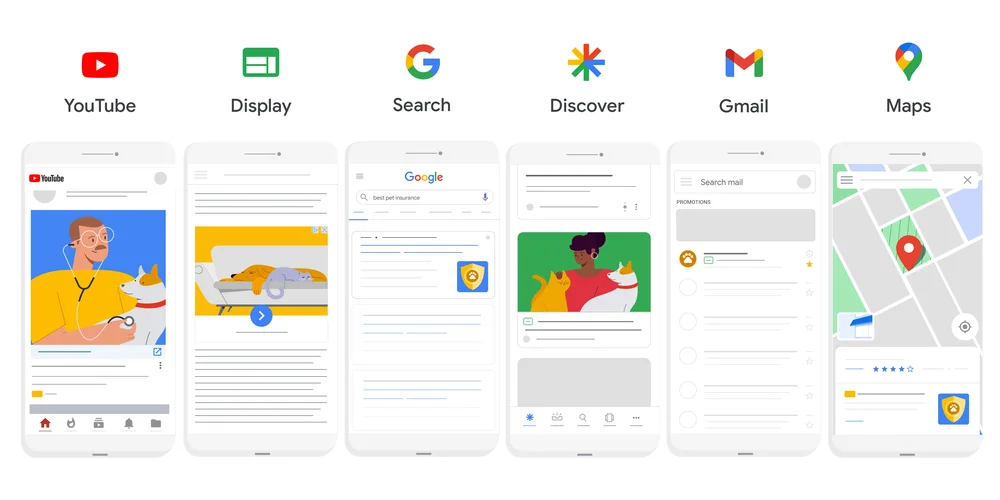
When you launch a Performance Max campaign, your ads become eligible to appear across Google's entire advertising network:
- Search Results: Just like traditional search campaigns
- YouTube: Video ads, banner ads, and shorts
- Display Network: Millions of websites and apps
- Gmail: Ads in email inboxes and promotions tabs
- Google Shopping: Product listings and comparison pages
- Google Maps: Local business ads and location-based results
Here's a real example from one of our clients, a local HVAC company. In their traditional campaigns, we allocated budget specifically: 60% to search, 30% to display, and 10% to YouTube. With Performance Max, Google automatically shifted budget based on performance: 45% went to search results, 25% to YouTube (we never would have predicted this), 20% to display, and 10% to Gmail ads.
The YouTube performance surprised us until we realized that homeowners often watch "how to fix your furnace" videos right before calling a professional. Google's algorithms picked up on this behavior pattern and capitalized on it.
This budget fluidity is both Performance Max's biggest strength and its biggest challenge. You get access to inventory and audiences you might never have considered, but you lose the ability to allocate budget strategically across different parts of your customer journey.
Keys to Success: What Actually Moves the Needle
Success with Performance Max isn't about set-it-and-forget-it automation. It's about giving Google's algorithms the right inputs so they can make smart decisions on your behalf. Here are the five areas that separate winning PMax campaigns from disappointing ones.
1. Setup That Sets You Up for Success
Asset Groups: Think Themes, Not Products
The biggest mistake we see is treating asset groups like individual product campaigns. Instead of creating an asset group for "red Nike shoes size 10," create one for "athletic footwear" or "running gear." Google's algorithms work better with broader themes that give them room to find patterns and optimize.
For a client in the home improvement space, we initially created separate asset groups for "kitchen cabinets," "bathroom vanities," and "closet organizers." Performance was mediocre. When we consolidated into "custom storage solutions," performance improved by 60% because Google could identify customers interested in multiple product categories and show them the most relevant option.
Audience Signals: Teaching Google Who to Target
Think of audience signals as suggestions, not restrictions. You're telling Google, "These are the types of people who typically convert for us," not "Only show ads to these people." Include your best customer data: website visitors who spent time on key pages, past purchasers, and lookalike audiences based on your best customers.
The key is variety. Don't just add one audience segment—add several different types so Google can identify patterns across different customer types.
Campaign Objectives: Why Choosing the Right Goal Matters
Google offers several Performance Max objectives: sales, leads, local store visits, and brand awareness. This choice affects how Google's algorithms optimize your campaign. Choose "sales" if you want online purchases, "leads" if you want form fills or phone calls, "local store visits" if you're trying to drive foot traffic.
We learned this the hard way with a client who wanted both online sales and in-store visits. When we chose "sales," the campaign drove excellent online revenue but barely any foot traffic. Switching to "local store visits" increased in-store sales but hurt online performance. The solution was running separate campaigns with different objectives.
Common Setup Mistakes We See All the Time
- Starting with too narrow audience signals (limits Google's ability to find new customers)
- Creating too many asset groups (splits budget and learning)
- Using the same headlines across multiple asset groups (reduces testing potential)
- Setting daily budgets too low (prevents Google from gathering enough data to optimize)
2. Creative Assets: Feed the Machine What It Needs
Google recommends providing at least 15 assets per asset group, but we've found that campaigns with 20+ high-quality assets consistently outperform those with the minimum. The key word is "quality"—don't just add assets to hit a number.
Headlines That Work vs. Headlines That Don't
Headlines That Work:
- "Free Estimate on Kitchen Remodeling" (specific, includes offer)
- "Same-Day Plumber Service Available" (addresses urgency)
- "Top-Rated Local HVAC Company" (credibility signal)
Headlines That Don't:
- "We're the Best" (vague, no proof)
- "Call Us Today" (no reason why)
- "Quality Service" (meaningless without context)
The best headlines combine your unique value proposition with specific benefits or offers. Google's algorithms will test different combinations to see what resonates with different audiences.
Images and Videos: Quality Over Quantity
High-quality visuals consistently outperform stock photos or low-resolution images. For service businesses, photos of your actual team, real projects, or local landmarks perform better than generic stock images. For product businesses, multiple angles, lifestyle shots, and user-generated content tend to win.
One of our clients, a local landscaping company, saw their Performance Max campaign take off when they replaced stock photos with before-and-after images of actual projects. The authentic visuals built trust and gave potential customers a clear picture of the results they could expect.
Real Client Example: How Better Assets Improved ROAS by 40%
A client in the fitness industry was running Performance Max campaigns with generic fitness stock photos and basic headlines like "Join Our Gym Today." Performance was okay—about 3:1 ROAS—but we knew it could be better.
We completely refreshed their assets with:
- Photos of their actual facility and equipment
- Headlines highlighting specific amenities: "24/7 Access + Personal Training Included"
- Video testimonials from real members
- Before-and-after transformation images (with permission)
The result? ROAS improved from 3:1 to 4.2:1 within six weeks. The authentic, specific assets helped Google's algorithms identify and target people who were serious about fitness, not just browsing.
3. Data Quality: Garbage In, Garbage Out
Conversion Tracking Setup: The Foundation Everything Relies On
If your conversion tracking is broken or incomplete, Performance Max campaigns will optimize for the wrong actions. We've seen campaigns that drove tons of traffic but few sales because they were optimizing for page views instead of purchases, or campaigns that focused on low-value leads because high-value conversions weren't properly tracked.
Make sure you're tracking all meaningful actions: online purchases, form submissions, phone calls, email signups, and in-store visits. Each conversion should have an appropriate value assigned so Google can optimize for revenue, not just volume.
Product Feeds for Ecommerce: Why Clean Data Wins
For ecommerce businesses, your Google Merchant Center feed is crucial. Incomplete product information, missing images, or incorrect pricing will hurt Performance Max performance. Google's algorithms rely on this data to match your products with relevant searches and audiences.
We had a client whose Performance Max campaigns were underperforming until we discovered that 40% of their products had incomplete descriptions in their Merchant Center feed. After cleaning up the data, performance improved dramatically because Google could better understand and promote their full product catalog.
First-Party Data Integration
The more Google knows about your customers, the better Performance Max performs. Upload customer lists, integrate with your CRM, and use Google Analytics to share conversion data. This first-party data helps Google identify patterns and find similar high-value prospects.
Attribution Windows: What Actually Makes Sense for Your Business
Default attribution windows might not match your actual sales cycle. B2B companies with longer sales cycles might need 30-day or 90-day attribution windows, while impulse-purchase businesses might perform better with shorter windows. Test different settings to see what provides the most accurate picture of campaign performance.
4. Budget Strategy: Don't Set It and Forget It
Starting Budgets: How Much Google Actually Needs to Learn
Google recommends a minimum daily budget that's 10x your target cost per conversion. If you typically pay $50 for a lead, start with at least $500 per day. This gives Google enough budget to run meaningful tests and gather optimization data.
Starting with too small a budget is one of the fastest ways to kill a Performance Max campaign. Google's algorithms need volume to identify patterns and optimize performance. If you can't afford the recommended minimum, consider whether Performance Max is the right fit, or if traditional campaigns might work better for your budget.
The 2-Week Learning Period (And What Happens If You Panic)
Every Performance Max campaign goes through a learning period where performance can be erratic. Google is testing different audiences, placements, and bidding strategies to understand what works for your business. During this time, you might see:
- Inconsistent daily performance
- Higher costs per conversion than expected
- Ads appearing in unexpected places
- Fluctuating conversion rates
The temptation is to make changes immediately, but this resets the learning process. We recommend waiting at least two weeks before making significant adjustments, unless you're seeing obvious technical issues like broken conversion tracking.
Scaling Up vs. Scaling Out
Once a Performance Max campaign is performing well, you have two options for growth: scale up (increase budget on the existing campaign) or scale out (create additional campaigns with different themes or targeting).
Scaling up is simpler and often more effective. Google's algorithms have already learned what works for your business, so giving them more budget typically leads to more results at similar efficiency.
Scaling out makes sense when you want to test different approaches: new product categories, different geographic areas, or alternative messaging strategies. Just remember that each new campaign goes through its own learning period.
Budget Allocation Across Multiple PMax Campaigns
If you're running multiple Performance Max campaigns, Google will automatically allocate budget to the highest-performing ones. This can leave newer or experimental campaigns underfunded. Consider using separate budgets or campaign priorities to ensure each campaign gets enough spend to optimize properly.
5. Ongoing Management: Less Control Doesn't Mean No Control
What to Monitor (Hint: It's Not CTR)
Traditional Google Ads metrics like click-through rate (CTR) and cost-per-click (CPC) are less meaningful in Performance Max because Google automatically adjusts bids and targeting to optimize for your chosen goal.
Focus on these metrics instead:
- Conversion Rate: Are people who click actually converting?
- Cost Per Conversion: What are you paying for each lead or sale?
- Conversion Value: How much revenue is each conversion generating?
- ROAS (Return on Ad Spend): How much revenue for every dollar spent?
Asset Performance Insights: The Data That Actually Helps
Google provides asset performance data showing which headlines, images, and videos are performing best. Use this information to create more assets similar to your top performers and pause or replace underperforming ones.
However, don't make changes too quickly. An asset that performs poorly in week one might become a top performer in week four as Google's algorithms learn how to use it effectively.
Negative Keywords: They Still Matter
Even though Performance Max campaigns don't use traditional keyword targeting, you can still add negative keywords to prevent your ads from showing for irrelevant searches. This is especially important for businesses with common names or products that might appear for unrelated searches.
For example, a client named "Apple Tree Services" (tree trimming business) was getting clicks from people searching for Apple computers. Adding negative keywords like "iPhone," "iPad," and "computer" helped focus the campaign on relevant tree service searches.
When to Kill a Campaign vs. When to Optimize
Not every Performance Max campaign will succeed. Here's how to decide whether to optimize or start over:
Optimize if:
- You're getting conversions but at higher cost than desired
- Conversion rate is good but volume is low
- Campaign has been running less than 4 weeks
- Asset performance data shows clear winners and losers
Kill and restart if:
- No conversions after 4+ weeks with adequate budget
- Conversion tracking issues that can't be fixed
- Target audience was completely wrong for your business
- Campaign was set up incorrectly from the beginning
Performance Max for Lead Generation
The Challenge: Converting Browsers into Buyers
Lead generation with Performance Max requires a different approach than ecommerce. You're not just trying to get people to buy something they already want—you're trying to convince them they have a problem you can solve, then get them to share their contact information.
This makes creative messaging and landing page alignment even more critical. Your ads need to address specific pain points, offer clear value, and create urgency around taking action.
Why PMax Works Differently for Lead Gen vs. Ecommerce
Ecommerce Performance Max campaigns optimize for purchase behavior—Google can easily identify people who are ready to buy based on their browsing and search history. Lead generation is more complex because the buying intent is often less clear.
Someone searching for "kitchen remodel" might be ready to hire a contractor next week, or they might just be getting ideas for a project they'll start in two years. Performance Max algorithms need more time and data to distinguish between serious prospects and casual browsers.
Conversion Actions That Matter for Lead Generation
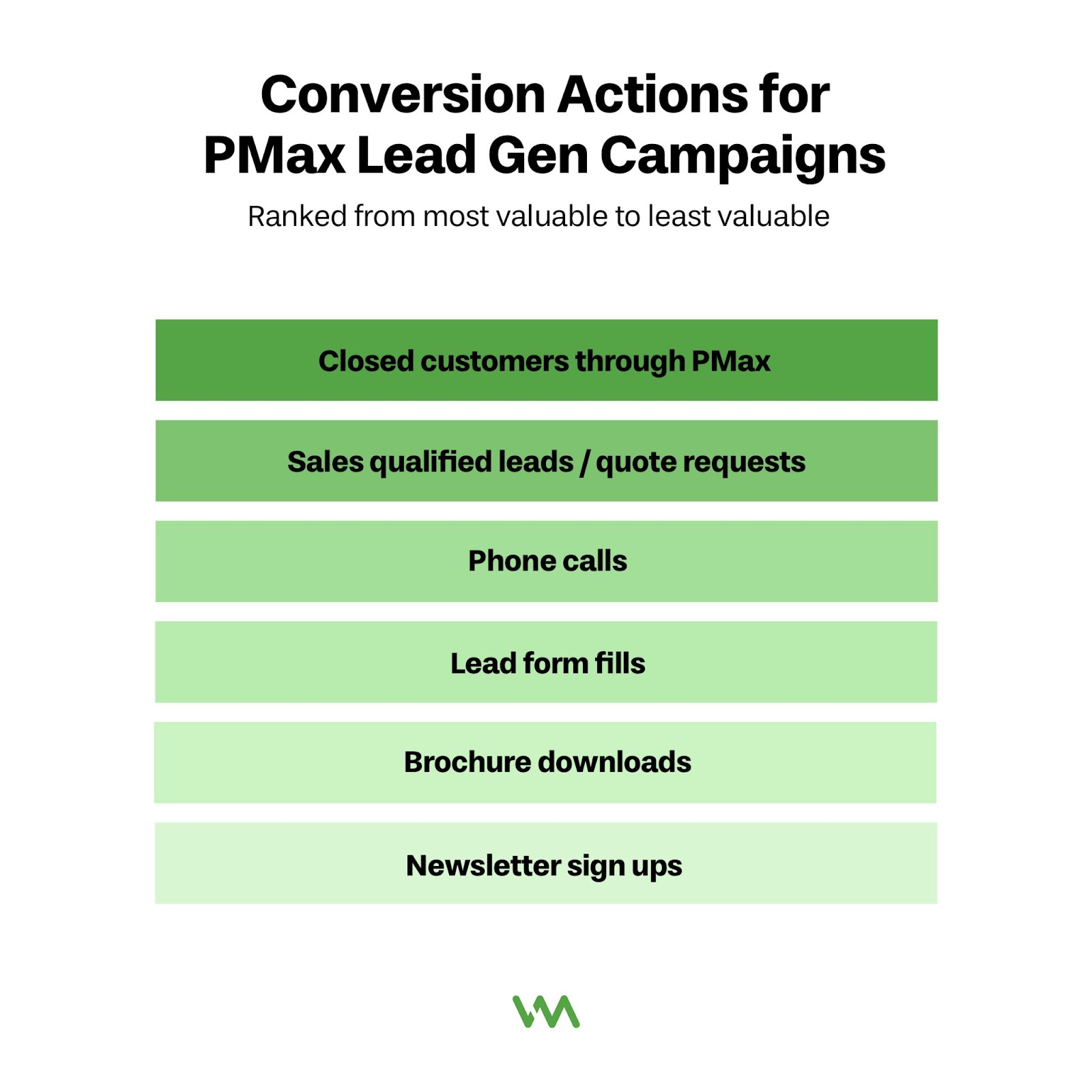
Set up multiple conversion actions with different values:
- Paid/closed customers (the best signal)
- Phone calls (typically highest value)
- Contact form submissions (medium value)
- Email newsletter signups (lower value but still meaningful)
- Quote requests (highest value)
- Brochure downloads (lower value)
This helps Google understand that a phone call from someone ready to hire you is worth more than someone downloading a free guide, so the algorithms can optimize accordingly.
Lead Quality Scoring and Attribution
Not all leads are created equal. A plumbing company getting calls for emergency repairs will see higher conversion rates than one getting calls for routine maintenance quotes. Work with your sales team to identify which lead sources produce the highest-quality prospects, then share that data back to Google Ads.
Client Case Study: Local Law Firm PMax Results
A personal injury law firm was struggling with expensive leads from traditional search campaigns. Their cost per lead was $400, and only about 20% of leads turned into clients, making their true cost per client acquisition $2,000.
We launched a Performance Max campaign focused on specific case types (auto accidents, slip and falls, workplace injuries) with assets that addressed common legal questions and fears. The campaign targeted people showing interest in legal services, recent accident victims, and audiences similar to their existing clients.
Results after three months:
- Cost per lead dropped to $180
- Lead quality improved—35% of leads became clients
- True cost per client acquisition fell to $514
- Overall lead volume increased by 150%
The key was creating asset groups around specific legal situations rather than trying to capture all personal injury leads with generic messaging.
Setup Considerations for Lead Gen
Audience Signals for Lead Generation Campaigns
For lead generation, focus on audience signals that indicate someone might need your services:
- People who visited specific service pages on your website
- Customers who purchased related products or services
- Audiences interested in problem-solving content related to your industry
- Geographic audiences in your service area
- Lookalike audiences based on your best clients
Avoid overly broad audiences like "homeowners" or "business owners" unless your service applies to a very wide market.
Creative Assets That Convert Browsers to Leads
Lead generation assets should focus on solutions, not features:
Instead of: "20 Years of Experience" Try: "Same-Day Emergency Plumbing Repairs"
Instead of: "Full-Service Marketing Agency"
Try: "Double Your Website Leads in 90 Days"
Instead of: "Certified Financial Planners" Try: "Retire 5 Years Earlier With the Right Strategy"
Include offers that make responding immediately more attractive: free consultations, limited-time discounts, or exclusive bonuses for new clients.
Landing Page Alignment with Campaign Messaging
Your landing pages must match the promise your ads are making. If your ad offers a "free roof inspection," the landing page should be specifically about roof inspections, not general roofing services.
We see a lot of campaigns driving traffic to generic "Contact Us" pages or homepage. This mismatch between ad message and landing page experience kills conversion rates. Create dedicated landing pages for each major asset group or service category.
Phone Call Tracking and Form Submissions
For service businesses, phone calls often convert better than web forms. Make sure your call tracking is properly integrated with Google Ads so the algorithms can optimize for phone leads, not just form submissions.
Use different phone numbers for different campaigns or asset groups so you can track which messages and audiences generate the highest-quality calls.
Performance Max for Ecommerce
The Sweet Spot: Where PMax Shines Brightest
Performance Max was essentially built for ecommerce businesses. Google has decades of data about online shopping behavior, which gives their algorithms a huge advantage in identifying potential customers and predicting purchase intent.
For product-based businesses, Performance Max can often find customers you never would have targeted manually, often at better costs than traditional Shopping or Search campaigns.
Why Product-Based Businesses See Better Results
Google's algorithms excel at understanding product intent because shopping behavior is relatively predictable:
- People research before buying
- They compare prices and features
- They often abandon carts and return later
- They buy related or complementary products
This behavioral data helps Performance Max identify the right moments to show your ads across different touchpoints in the customer journey.
Shopping Campaigns vs. PMax: When to Use Which
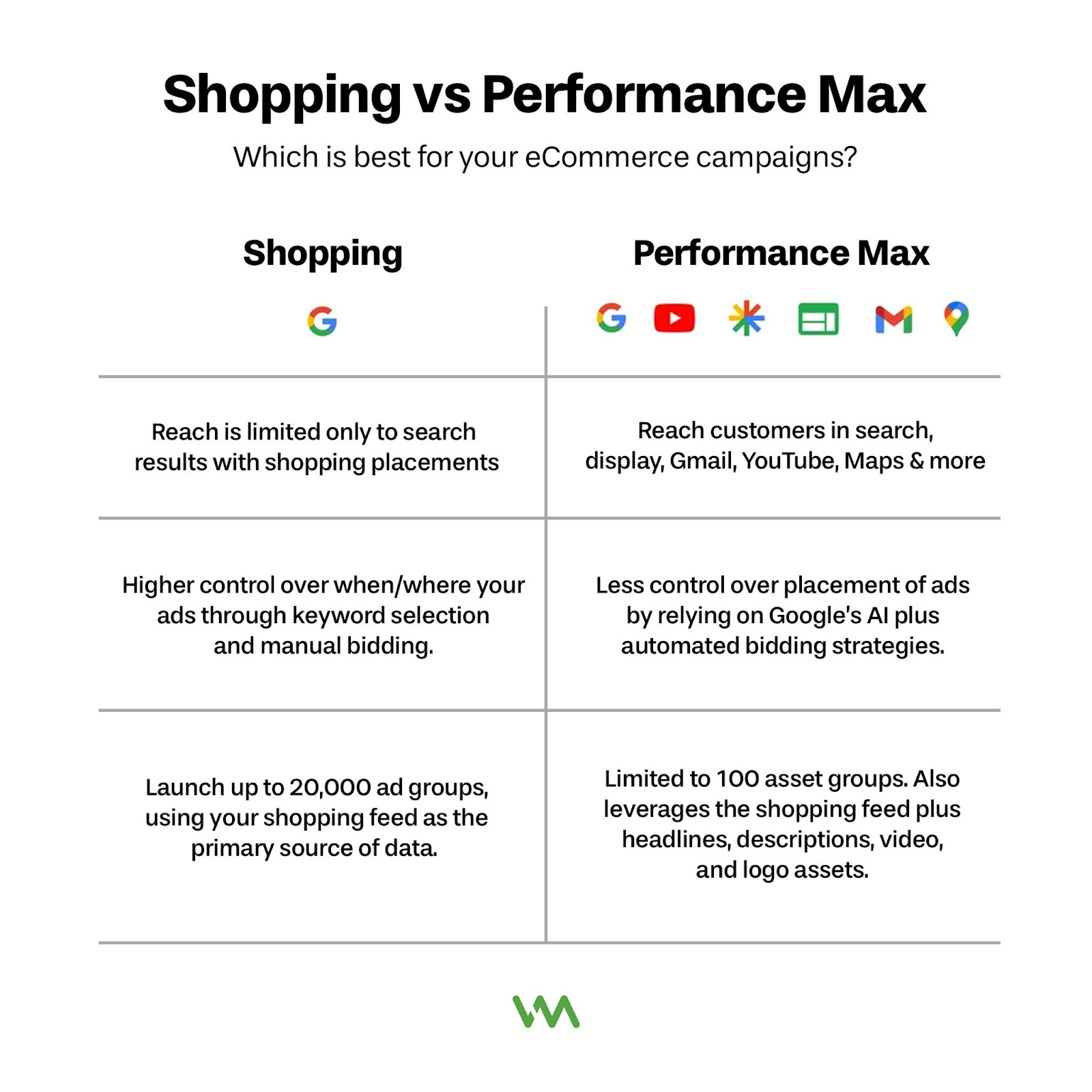
Traditional Shopping campaigns still have their place, especially if you need precise control over bidding for specific products or want to focus exclusively on high-intent shopping searches.
Use Shopping campaigns when:
- You have a limited product catalog (under 100 products)
- Profit margins vary significantly between products
- You need granular bid control for seasonal or promotional pricing
- Brand new business with no conversion data
Use Performance Max when:
- You have hundreds or thousands of products
- You want to reach customers across multiple touchpoints
- You have solid conversion tracking and at least 30 conversions per month
- You're comfortable with automated bidding
Many successful ecommerce accounts run both campaign types simultaneously, using Shopping campaigns for core products and Performance Max for discovery and remarketing.
Product Feed Optimization for PMax Success
Your Google Merchant Center feed is the foundation of ecommerce Performance Max success. Google's algorithms rely on this data to match your products with relevant searches and audiences.
Critical feed elements:
- Complete product titles with relevant keywords
- High-quality product images (multiple angles, lifestyle shots)
- Detailed product descriptions that address customer questions
- Accurate pricing and availability updated in real-time
- Product categories that match Google's taxonomy
- Custom labels for promotions, seasons, or profit margins
Ecommerce-Specific Setup
Asset Groups by Product Categories vs. Single Products
Create asset groups around product categories or themes rather than individual products. For example, a clothing retailer should create asset groups for "women's dresses," "men's casual wear," or "athletic apparel" rather than individual SKUs.
This approach gives Google's algorithms more flexibility to promote your best-selling or highest-margin products within each category based on real-time demand and performance.
Seasonal Campaign Strategies
Ecommerce businesses should adjust Performance Max campaigns seasonally:
- Holiday Season: Increase budgets, add gift-focused messaging, create urgency around shipping deadlines
- Back-to-School: Shift asset groups toward relevant products, adjust audience signals for parents
- Summer/Winter: Promote seasonal products, pause asset groups for off-season items
Plan these changes in advance because Performance Max campaigns need time to re-learn and optimize after significant modifications.
Integration with Google Merchant Center
Beyond basic product feeds, take advantage of advanced Merchant Center features:
- Promotions (sale prices, free shipping offers)
- Local inventory (show in-store availability)
- Product ratings (customer review stars)
- Dynamic remarketing (show ads for products people viewed)
These features give Performance Max more ways to attract and convert customers across Google's network.
Client Example: Fashion Retailer's PMax Transformation
A mid-size fashion retailer was managing 15 different campaign types: separate Shopping campaigns for men's and women's clothing, brand campaigns, remarketing campaigns, and display campaigns for new customer acquisition. Management was complex, and budget allocation was always a challenge.
We consolidated their entire account into three Performance Max campaigns:
- Women's Fashion (dresses, tops, accessories)
- Men's Fashion (shirts, pants, shoes)
- Athletic Wear (both men's and women's active wear)
Each campaign had 25+ assets showcasing different products, lifestyle imagery, and messaging focused on style, quality, and value.
Results after 6 months:
- Overall ROAS improved from 4.2 to 6.8
- New customer acquisition increased by 85%
- Management time reduced by 70%
- Average order value increased by 15%
The biggest surprise was Performance Max finding customers through YouTube and Gmail ads—channels they had never successfully used before. The algorithms identified that their target customers were watching fashion and lifestyle content on YouTube, then converted them with well-timed product ads.
Common Mistakes (And How to Avoid Them)
After managing dozens of Performance Max campaigns across different industries, we've identified the mistakes that consistently hurt performance:
Starting with Too Small a Budget
We see this constantly: business owners want to "test" Performance Max with $20-30 per day budgets. Google's algorithms need volume to learn and optimize. If you can't afford at least $300-500 per day, consider sticking with traditional campaign types until your budget grows.
Over-Optimizing During the Learning Period
Performance Max campaigns can look terrible in week one and amazing by week four. Resist the urge to make changes during the initial learning period unless you spot obvious technical issues. Every major change resets the learning process.
Neglecting Asset Variety and Testing
Don't just create 15 assets to meet Google's minimum requirement. Successful Performance Max campaigns continuously test new headlines, images, and videos. Set up a process to regularly review asset performance and add new creative elements.
Ignoring Audience Signals
Some advertisers skip audience signals entirely, thinking they're limiting Google's reach. Actually, audience signals help Google learn faster by providing starting points for optimization. Always include multiple, relevant audience segments.
Not Aligning Landing Pages with Campaign Goals
Your landing pages must be optimized for the action you want people to take. If you're optimizing for phone calls, make your phone number prominent. If you want form submissions, make the form the focal point of the page.
The Bottom Line: When PMax Works (And When It Doesn't)
Performance Max isn't right for every business or every situation. Here's how to know if it's a good fit:
Perfect PMax Candidates:
Established Businesses with Conversion History Google's algorithms work best when they have data to learn from. If you've been running Google Ads for at least 6 months and getting regular conversions, you're a good candidate for Performance Max.
Multiple Product Lines or Services
Businesses with diverse offerings give Performance Max more opportunities to find winning combinations. A single-product business might see better results with focused Search or Shopping campaigns.
Sufficient Monthly Ad Spend ($2,000+) Performance Max needs volume to optimize effectively. If your total Google Ads budget is under $2,000 per month, you're probably better off with traditional campaigns that give you more control over budget allocation.
Clean Conversion Tracking If your conversion tracking is accurate and complete, Performance Max can optimize effectively. If you're unsure whether people who convert online also call you, or if your ecommerce tracking is missing sales, fix these issues before launching Performance Max.
Skip PMax If:
Brand New Business with No Data If you've never run Google Ads or have very limited conversion history, start with Search campaigns to gather data and understand your customers before moving to Performance Max.
Very Niche, Specialized Offerings Businesses serving extremely specific markets or offering highly specialized services often perform better with precisely targeted Search campaigns rather than broad automated targeting.
Extremely Limited Budget If you can only afford $10-20 per day, use that budget for focused Search campaigns targeting your most important keywords rather than spreading it thin across Performance Max automation.
Need Very Specific Targeting Control Some businesses have strict requirements about where their ads appear or who sees them. Performance Max gives you limited control over placement and targeting, so traditional campaigns might be better if you need precision.
Trust But Verify (Your PMax Performance)
Just like we discovered with Meta Ads overreporting in our previous analysis, it's crucial to verify Performance Max results with independent tracking tools. Google's attribution can be generous, especially for campaigns that touch multiple touchpoints in the customer journey.
We recommend using tools like Google Analytics 4, third-party conversion tracking platforms, or CRM integration to validate that the results you're seeing in Google Ads match your actual business outcomes. This is especially important for lead generation campaigns where the quality of leads matters as much as the quantity.
Setting Realistic Expectations with Your Team/Agency
Performance Max is powerful, but it's not magic. Set realistic expectations:
- Allow at least 4-6 weeks to see stable performance
- Expect some volatility during the learning period
- Budget 10-20% more than your target to give algorithms room to optimize
- Plan to refresh creative assets every 2-3 months
Next Steps for Getting Started or Optimizing Existing Campaigns
If you're new to Performance Max:
- Audit your current conversion tracking
- Gather high-quality creative assets (20+ per asset group)
- Start with one campaign focused on your core offering
- Set appropriate budgets and wait for the learning period to complete
If you're already running Performance Max:
- Review asset performance and refresh underperforming creative
- Analyze placement data to understand where your best results come from
- Test different audience signals to improve targeting
- Consider expanding successful campaigns or launching additional asset groups
Questions to Ask Your Current Agency About PMax
If you're working with an agency, here are key questions to evaluate their Performance Max expertise:
- How do you decide between Performance Max and traditional campaigns for my business?
- What conversion tracking setup do you recommend for my goals?
- How do you create and test new assets for ongoing optimization?
- What third-party tools do you use to verify Google Ads performance?
- How do you handle budget allocation across multiple Performance Max campaigns?
Performance Max represents a significant shift in how Google Ads works, moving from manual control to algorithmic automation. For businesses with the right setup and realistic expectations, it can deliver exceptional results with less day-to-day management than traditional campaigns.
The key is understanding that less control doesn't mean no strategy. Success with Performance Max requires thoughtful setup, quality creative assets, clean data, and ongoing optimization—just with a different approach than what many advertisers are used to.
Whether you love the automation or miss the granular control of traditional campaigns, Performance Max is quickly becoming the dominant way businesses advertise on Google. The sooner you understand how to use it effectively, the better positioned you'll be to capitalize on its potential for your business.
